
This post was written without using AI for content organization.
Background
- I started this after seeing an Anthropic engineer on X say something like “using agent pipelines is convenient, so why aren’t you doing it??”
- I suspected this could just be promotional content encouraging heavy Claude token usage, since I expected agent pipelines to waste a lot of tokens, but I wanted to try out this new technology anyway.
What I wanted to find out
- Can an agent pipeline be implemented without human intervention?
- If intervention is needed, what is the minimum amount required, and where?
- How do agents communicate with each other within an agent pipeline, and what does that communication consist of?
- How much token consumption is involved when working with an agent pipeline?
Implementation
- GitHub link: https://github.com/dpcivl/agent-pipeline-lab
Experimental method
- In the main session, I handled the experiment planning, the sub-agent configuration, and the design of the project to be used for the experiment.
- I didn’t write the detailed design draft myself — I reviewed the mockup produced from the design, then proceeded with implementation.
- I used separate worktrees for the session developed via the agent pipeline and the session developed through human prompting, so they wouldn’t affect each other.
- I ran a total of 3 feature implementations for comparison.
List of sub-agents
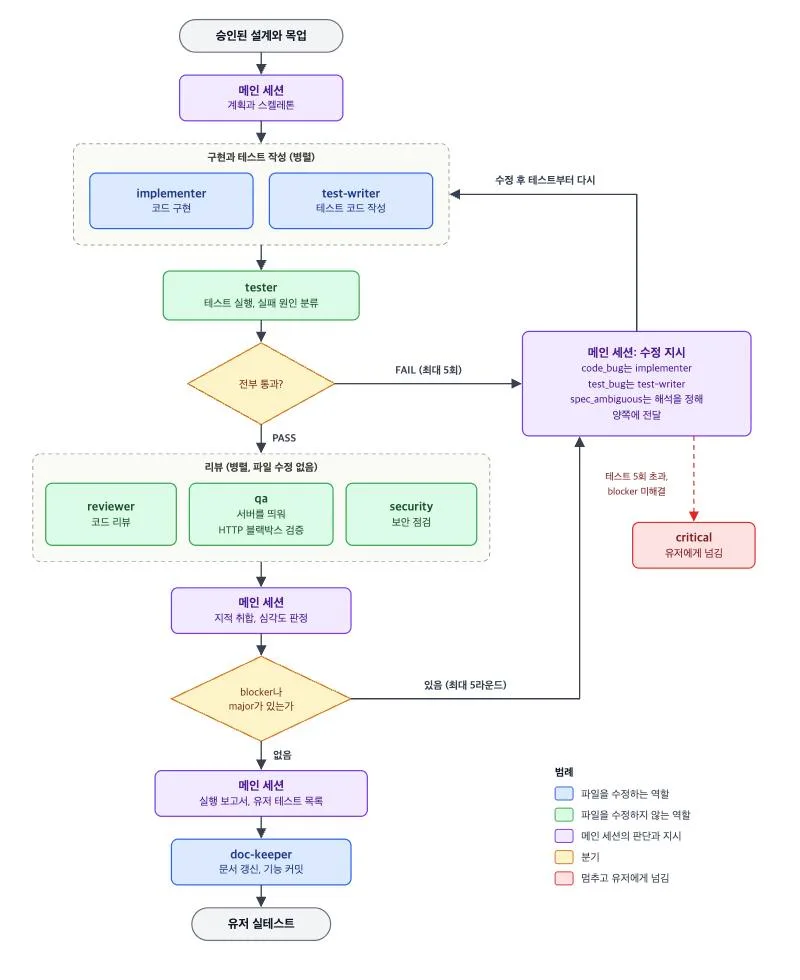
- implementer: implements code
- test-writer: writes test code
- tester: runs tests
- reviewer: reviews code
- qa: spins up the server for HTTP black-box verification
- security: handles security
- doc-keeper: manages documentation and configuration
Results
Agent pipeline — F1 results
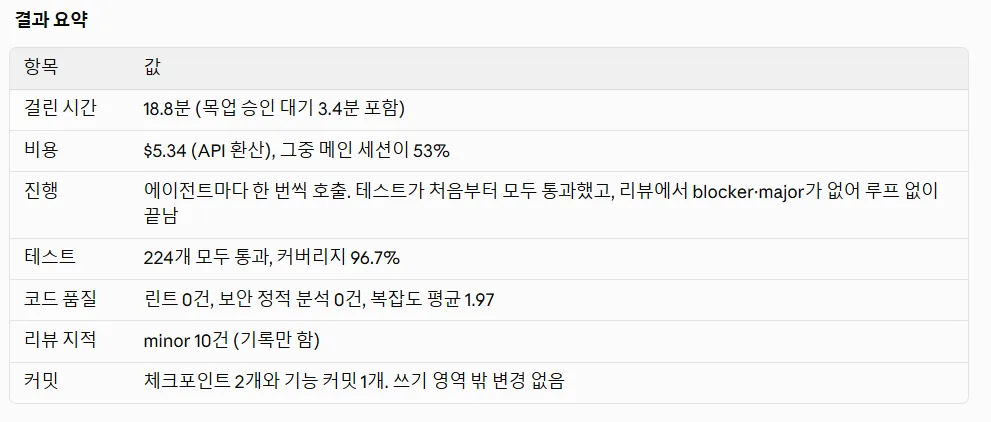
- I only did a quick sanity check on the mockup approval and moved on.
- F1 report link: https://github.com/dpcivl/agent-pipeline-lab/blob/main/research/runs/F1/default/r2/artifacts/F1-report.md
- This is the general approach: measure a baseline, measure the pipeline implementing the feature, and measure a human implementing the feature.
Is an agent pipeline usable?
- Yes, it’s usable.
- But I’m still concerned about how to maintain it.
- How do you handle security issues? How do you handle verification issues? How would you even know if something is causing trouble somewhere out of sight?
How did the AI agents communicate?
- The details are organized separately as samples in the report.
- They used headers and lists to organize and share what work had been done or needed to be done, broken down by issue.
- It felt similar to how a person speaks. However, it came across as overly professional — at least by my standards.
Token consumption of the agent pipeline
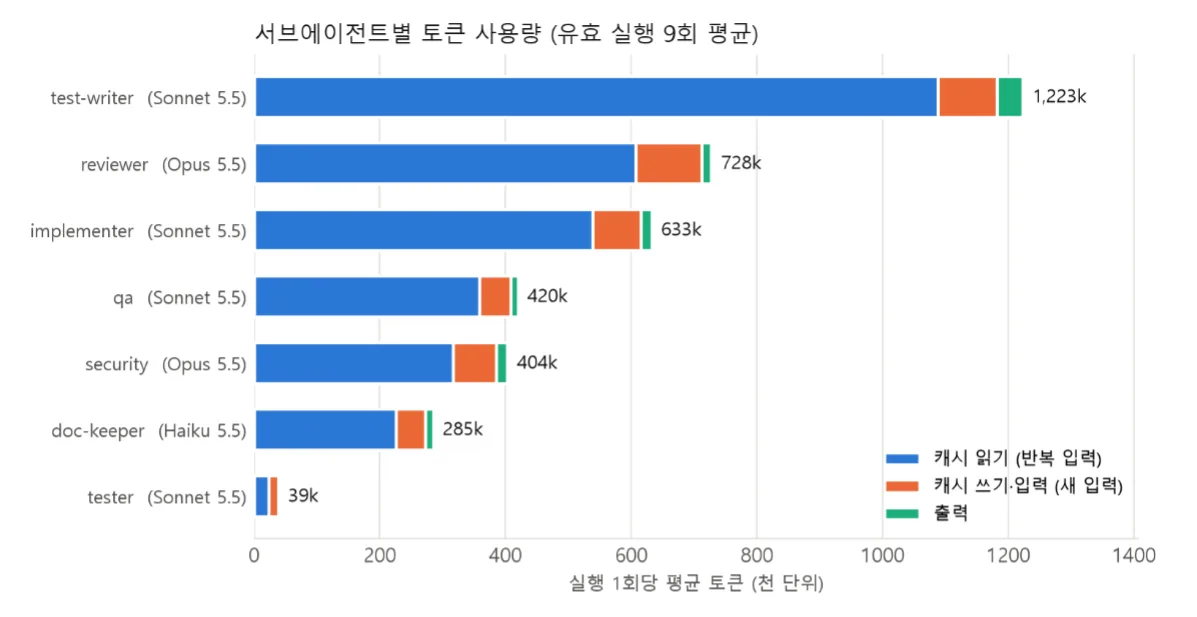
- Token usage is shown below.
- Cost is shown below.
- Although token usage was high for feature implementation and test code implementation, the cost ended up lower than for the roles that used Opus.
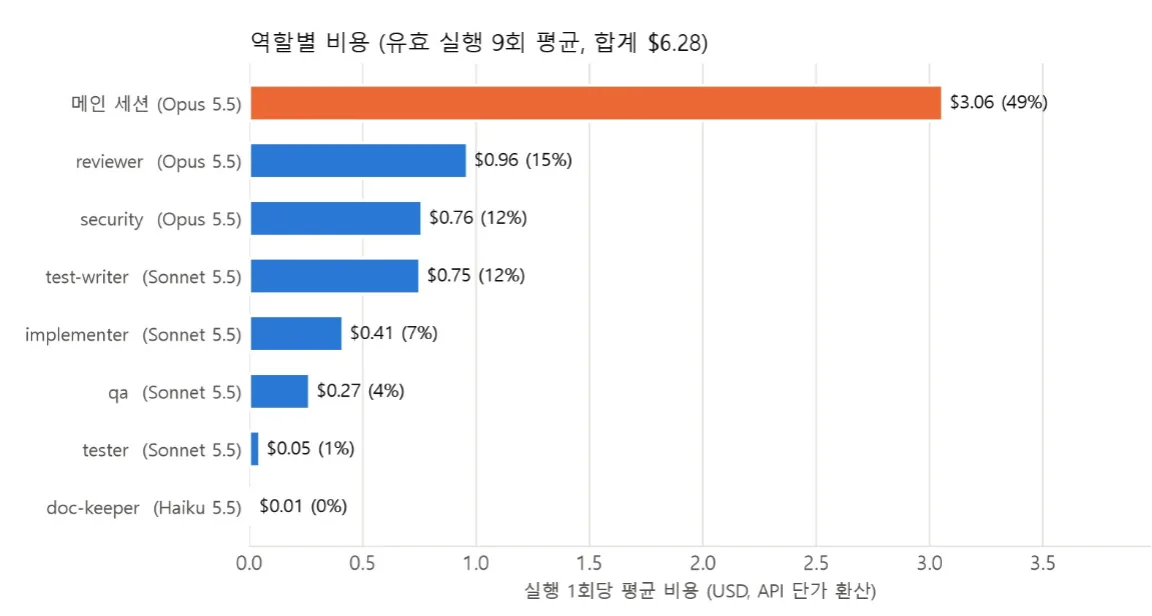
- Although token usage was high for feature implementation and test code implementation, the cost ended up lower than for the roles that used Opus.
Limitations
- The libraries each agent used were whatever the AI recommended — they weren’t selected after weighing individual trade-offs.
- I intended to compare human-involved work against fully automated implementation, but in practice the “human-involved” cases just meant a human reviewed and clicked approve. So aside from the human being a bottleneck, every case ended up being an AI-implemented result, which made the comparison meaningless.
- I originally planned to go up to r3, but for the reason above I stopped at r2 and drew conclusions from there.
- The service is small.
- I expect the cost of reading context would be much higher in a larger codebase.
Things I got curious about along the way
Measuring fixed overhead tokens per role
- This measures the “base fee” that’s charged every time an agent is called, regardless of the content of the work.
- Reason for doing this: it lets you distinguish whether communication between agents is expensive, or whether the call itself is expensive.
- This was to establish a baseline for token usage.
- I also compared cold start versus warm start.
- I learned that comparing cold start and warm start is something you should basically always do when calling AI models.
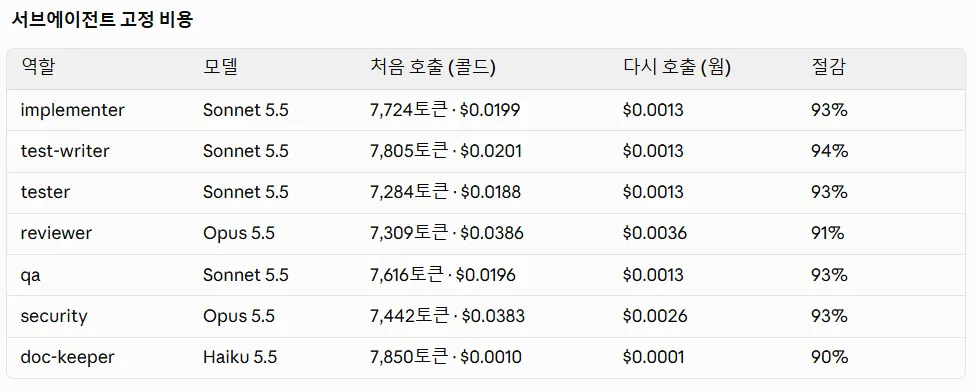
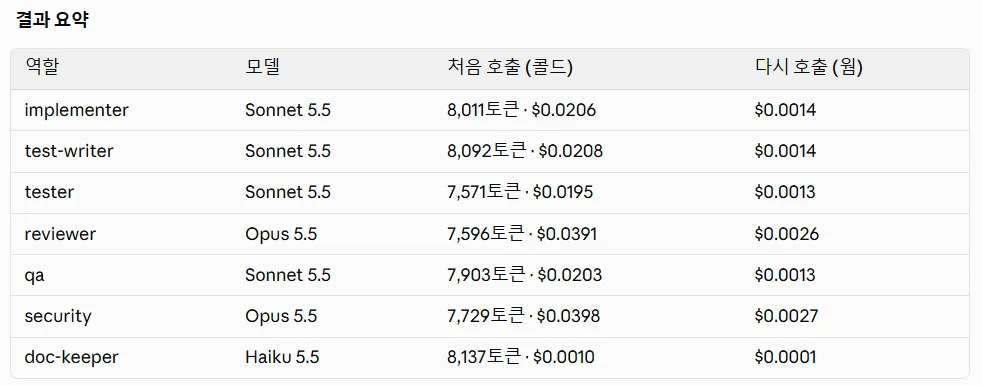
- The first measurement was taken in the main session where the sub-agents were defined; the second was taken in the worktree containing the agent pipeline.
- Usage increased by exactly 287 tokens each time.
- Only environment information like the working directory path changed — everything else was reproduced identically.
Hidden evaluation tests
- What I did: for each feature, I created a separate test that checks the acceptance criteria (AC) from the design document.
- If the agent could see this test, it might implement code to just pass the test instead of actually building the feature.
- So I placed it outside the repository, in an environment the agent couldn’t see.
- This test is less a quality check for the pipeline and more a measurement tool for the experiment.
- A question I have: these days AI tools seem to pull in content from other directories they have access to, not just the project directory I’m working in — so does simply being outside the git scope actually make a difference?
- Ceiling effect: put simply, when too many participants get a perfect score, you can’t tell who’s actually smarter.
- The hidden evaluation tests also passed 107/107, but the tests were too easy, so it can’t really be said that proper verification occurred.
- I addressed this by supplementing with static metrics, number of review findings, cost, loop count, and blind comparison evaluation.
Points where I got stuck
I assumed I’d review the mockup myself before implementation, but that wasn’t the case
- The direction the AI designed turned out to be a simple service, so it ended up being purely API-related with no UI at all.
- This happened because I failed to share context about which development domain the pipeline was meant to be used for, which sent things in the wrong direction.
- I’ve now explicitly specified that this pipeline is meant for use in web development and app development.
I tried to run testing, review, QA, and security in parallel, but that was wrong
- There’s no need to review code that failed its tests.
- The correct approach is to run the subsequent stages in parallel only after the tests turn green.
A bug in a hook stopped the mockup implementation
- A bug in a hook implemented in the main session was found in the execution session, which stopped execution and required a fix request.
Takeaways
- I think the right way to use an agent pipeline is to handle the mockup myself, then hand off implementation and verification after the mockup to the agents.
- I had assumed token usage and cost were the same concept, but I learned they’re different.
- Even using a lot of tokens with Haiku can end up cheaper than using fewer tokens with Opus.
Next steps
- Can the agent pipeline I built be integrated into an existing project and used for feature-level implementation?
- Is a workflow possible where a Ralph loop handles the mockup, AI orchestration handles the implementation, and real tests confirm the feature works?
- How would I go about comparing a pipeline that runs everything on auto against an implementation where a human handles everything manually? (I probably won’t do this.)
- How do I verify that things are proceeding in the right direction?
- As AI advances this far, in what direction should humans develop?
- Domain-specialized developers: dig deep into a specific domain and provide solutions for the parts general-purpose LLMs can’t solve.
- Developers who can own and finish an entire project: adopt AI as an augmentation and use it to boost productivity across every area of work a project requires.