
This post was not organized using AI.
Background
- I think that to work as an AI engineer, you need to understand what AI tools are available to you.
Claude skills
- Skills are the task manuals Claude pulls out when needed.
- Claude skills consist of metadata, instructions, and resources.
- The metadata is a one-line summary of the skill.
- If the metadata is relevant to the user’s request, Claude opens up the instructions.
- If, after reading the instructions, Claude decides to use the skill, it uses the resources during the task.
Let’s try using it first
- I’ve been having fun building AI pipelines lately.
- So I decided to make three skills and call them to implement a feature.
- While implementing, I ended up creating an additional security skill.
How to set it up
- Ask Claude to generate it as a card.
- Or write the file yourself and register the skill with Claude.
- Either way, you just need to place the file at
~/.claude/skills.
Design skill
- For the design stage, I wanted to use RPI and the Ralph loop.
- The goal is a mockup deliverable for the feature definition.
- When you describe the technique in a Claude session, it generates something like this.
- After checking that the features I had in mind were reflected in the source, I saved it.
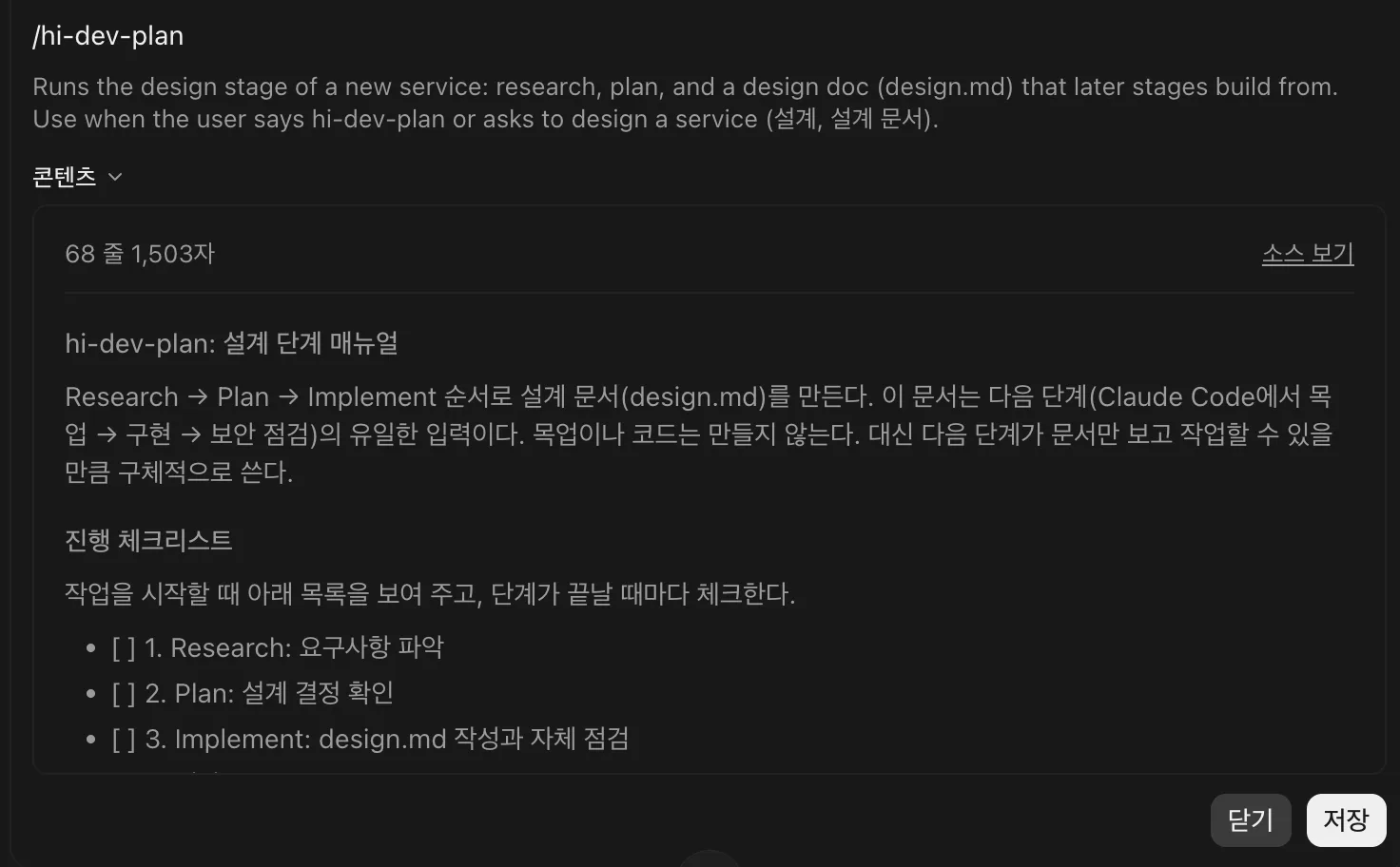
- After checking that the features I had in mind were reflected in the source, I saved it.
- I created /hi-dev-plan, and through RPI it produced the design document, design.md.
- Since skills are just manuals and not programs, Claude can’t keep running the Ralph loop on its own.
- So I decided to have the skill stop once design.md is generated, and set up the Ralph loop separately by placing a SKILL.md so it runs via
claude -p.
- So I decided to have the skill stop once design.md is generated, and set up the Ralph loop separately by placing a SKILL.md so it runs via
- A skill saved as a card is stored on your account, not in the project directory.
- It’s better to manage it together within the project directory, but if you put it in the same skills folder, you end up with two skills of the same name. So I created a separate folder for managing the source and just duplicated the content inside the markdown.
Mockup skill
- To build the skill for generating mockups via the Ralph loop, I set up a directory.
- I created the folder in VSCode. If you don’t do it that way, folders like
.claudemight fail to be created due to reserved names.
- I created the folder in VSCode. If you don’t do it that way, folders like
---
name: hi-dev-mockup
description: Builds an HTML mockup from docs/design.md one step per run, tracking progress in docs/mockup-progress.md. Run by the Ralph loop script or with /hi-dev-mockup for a single step.
disable-model-invocation: true
allowed-tools: Read Write Edit Bash(bash .claude/skills/hi-dev-mockup/scripts/check_ids.sh)
---- This was the initial content of SKILL.md.
- Claude decides whether to use the skill based on the description.
- But since
disable-model-invocationis set to true, the user has to invoke the skill directly. - The content between the
---lines above is called the “name tag.”
# hi-dev-mockup: 목업 단계 매뉴얼 (랄프 루프 1회분)

이 매뉴얼은 **한 번 실행에 한 걸음만** 진행한다. 반복은 바깥의 `scripts/ralph.sh`가 맡는다.
매 실행은 이전 대화를 기억하지 못하므로, 기억은 전부 `docs/mockup-progress.md` 파일에 남긴다.

## 입력과 출력
- 입력: `docs/design.md` (hi-dev-plan이 만든 설계 문서. 수정하지 않는다)
- 출력: `mockup/index.html` (목업), `docs/mockup-progress.md` (진행 기록)- This is the content written below the name tag.
- It’s the body of the manual that Claude reads when it pulls out the skill.
- By explicitly stating that the outer Ralph loop script is responsible for repetition, I prevent Claude from looping on its own.
## 매 실행 순서

### 1. 상황 파악
- `docs/design.md`를 읽는다. 없으면 "docs/design.md가 없습니다. hi-dev-plan을 먼저 실행하세요."라고 말하고 멈춘다.
- `docs/mockup-progress.md`를 읽는다. 없으면 첫 실행이므로 아래 양식으로 만든다. design.md의 화면 ID(S1, S2…)와 기능 ID(F1, F2…)를 하나도 빠짐없이 옮긴다.

```
# 목업 진행 기록

## 할 일
- [ ] S1: (화면 이름)
- [ ] F1: (기능 이름) - 완료 기준: (design.md의 완료 기준)

## 실행 기록
```- The content above makes Claude stop immediately without hallucinating if design.md doesn’t exist.
- It has Claude read mockup-progress.md in case the mockup process got interrupted midway.
### 2. 한 걸음 작업
- 체크되지 않은 항목 중 **맨 위 하나만** 고른다. 화면(S)을 기능(F)보다 먼저 한다.
- 그 항목만 `mockup/index.html`에 만들거나 고친다. 다른 항목은 건드리지 않는다.
- 목업 규칙:
  - HTML 파일 하나, 외부 라이브러리 없이 HTML/CSS/JavaScript만 쓴다.
  - 데이터는 그럴듯한 한국어 더미 데이터로 채운다. 서버 연동은 하지 않고 흉내만 낸다.
- 화면 영역 시작에 `<!-- S1 -->`, 기능 요소 근처에 `<!-- F2 -->`처럼 ID 주석을 단다.- Because of the nature of the Ralph loop, it implements just one item at a time, looping repeatedly until the feature is complete.
### 3. 검증
- `bash .claude/skills/hi-dev-mockup/scripts/check_ids.sh`를 실행해 ID 주석이 빠진 항목을 확인한다.
- 방금 작업한 항목의 완료 기준을 HTML 코드와 대조한다.
- 둘 다 통과하면 그 항목을 `[x]`로 체크한다. 통과하지 못하면 체크하지 않고 이유를 기록한다. 다음 실행이 이어서 고친다.- Verification is handled by the check_ids.sh script.
### 4. 기록
- `## 실행 기록` 맨 아래에 한 줄을 추가한다. 예: `- 3회차: F2 목록 정렬 추가, 검증 통과`
- 모든 항목이 체크되었고 check_ids.sh가 통과하면, 파일 맨 마지막 줄에 정확히 `STATUS: DONE`을 쓴다.
- 그 외에는 `STATUS: DONE`을 절대 쓰지 않는다.- Each loop iteration appends its execution record to the execution log.
- Once
STATUS: DONEappears, mockup generation is considered complete.
## 하지 말 것
- 한 번에 여러 항목을 처리하지 않는다.
- design.md에 없는 기능을 추가하지 않는다. 필요해 보이면 실행 기록에 "제안:"으로 남긴다.
- 검증하지 않고 체크하지 않는다.-
This restates points that were already mentioned above, under “Don’ts.”
- It repeats them because if the document gets too long, those points could get missed.
-
Once it’s set up this way, SKILL.md is ready, and you need to prepare the scripts mentioned in the document at the correct path.
-
Asking Claude to generate and save it as a card is quick, but setting up SKILL.md directly requires writing it out like this.
-
For the very first mockup, you can just call /hi-dev-mockup to generate it. But if there are multiple features and you want to see the complete mockup all at once, you need to run ralph.sh directly via a bash command.
- This is because a skill can’t start a new conversation each time on its own — the Ralph loop is used so that
claude -pstarts a new conversation. - The manual stays as the skill; the repetition is handled by the script.
- This is because a skill can’t start a new conversation each time on its own — the Ralph loop is used so that
Implementation skill
- Implementation was done through AI orchestration.
- The AI orchestration setup followed the same spec I had used before while experimenting with agent pipelines.
- At this stage, beyond writing SKILL.md, I also created an agents folder inside the .claude folder and wrote the markdown files for the subagents myself.
- The content of SKILL.md was long, so I only reviewed whether the content was correct and moved on.
- It contained details on how to use the subagents created in the agents folder.
- I passed along materials on how to set up the AI orchestration and what the workflow looks like, and had it write SKILL.md based on that.
Security skill
- I made a separate skill for attacking from the outside.
- The goal is to attack a Dockerized version of the built service to find vulnerabilities.
- The default is to attack using fable, but since fable often gets stuck when implementing security-related attacks, I set it to switch to opus if it keeps getting stuck.
- If a vulnerability is found, it’s set up to report it along with a reproduction method so the issue can be reproduced.
- What worries me is that I’m attacking a Docker service from a MacBook environment, and I’m concerned the attack target might suddenly shift and cause problems.
- So for now, I’ve only set it up without actually running it.
- Instead of an attacker, I created an audit skill.
- Instead of attacking, it reads through the entire codebase and checks whether anything needs fixing from a security standpoint.
- It uses several of the security agents created during the implementation stage to perform the check.
Building a service using skills
- While studying for the Big Data Analysis Engineer practical exam, I built a simple service for tracking study time and taking notes.
- I plan to post about my experience with the Big Data Analysis Engineer exam on the blog later, and I’m gathering material for that.
- GitHub link: https://github.com/dpcivl/study-log-manager
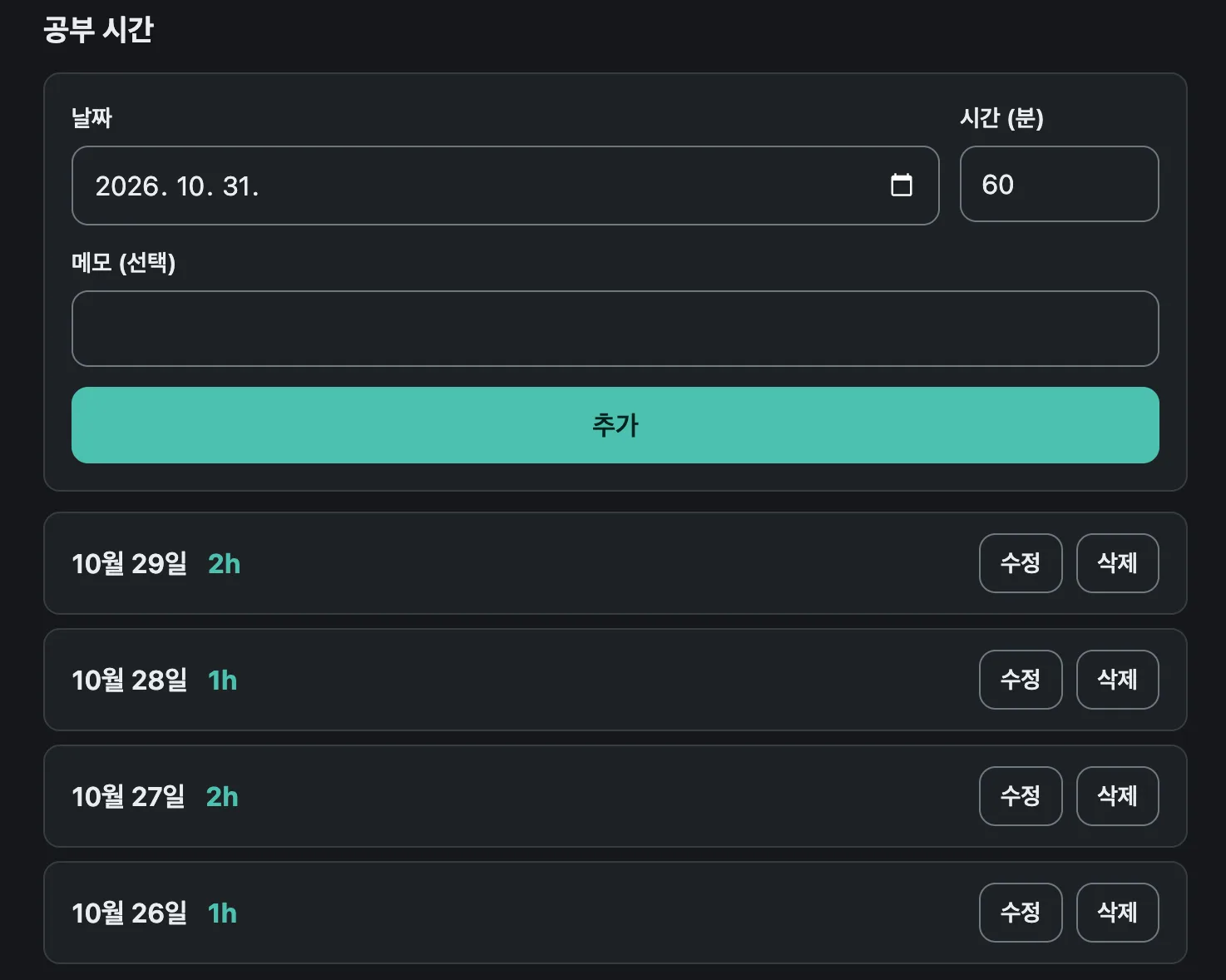
- I succeeded in building it with minimal intervention, but it took more time than expected — about 3 hours.
Summary
- Claude skills are useful for repetitive tasks that can be standardized.
- For example, getting outputs in the same format, or performing similar tasks repeatedly.
- Define the skill first, then call it whenever you need it.
Issues I discovered
- While implementing the mockup, I used the Ralph loop and found a case where it misread
STATUS: DONEand stopped even though mockup implementation was only partially done. - Directly invoking a skill like /hi-dev-impl only implements one item and then stops.
- If you instead just ask it to use the skill to implement all the designed features, it implements everything through to the end, and you can review it afterward.
Next steps
- I’d like to use the SKILL I built this time so that my pipeline can be used to implement features across multiple projects.
- I plan to apply this pipeline to an existing project and try adding a feature with it.
- I also want to improve it into a generic pipeline that can work across various fields, not just web development.
- I haven’t yet tried uploading files to Claude and applying them as a skill. I plan to try that later.