
Following multi-turn → system prompts, this time I studied streaming. My first impression was “isn’t this just an output style that looks nice?” But once I actually tried it and traced the event order, it turned out to be a more essential feature than I expected.
Table of contents
Open Table of contents
What streaming is
I turned on the streaming option and ran the same chat example. The result: the text didn’t arrive all at once — it came in chunks, gradually filling the screen. This is the same flowing output we’re familiar with from the ChatGPT/Claude web UI.
In non-streaming mode, the client receives the whole response as one block after the model finishes generating it. In streaming mode, the client receives tokens the instant the model generates them.
”Wait, why use this? Isn’t it just a matter of taste?”
That was my first question. Since the total time it takes the model to finish the response should be the same either way, what’s the difference between receiving it in a stream versus all at once?
Once I actually worked through it, the answer became clear.
The key is TTFT — Time To First Token
The time it takes for the user to see the first character.
This is where the essential difference between non-streaming and streaming lies.
| Non-streaming | Streaming | |
|---|---|---|
| When first character appears | After response completes (3–10s) | Immediately after first token is generated (~hundreds of ms) |
| Total time until response completes | Similar | Similar |
| Perceived speed | ”Slow" | "Fast” |
Even when the total time is the same, people perceive it as faster. Staring blankly at an empty screen for 5 seconds and watching the first word appear immediately and gradually fill in over 5 seconds are completely different experiences. The difference is whether there’s a visual signal that something is progressing.
Additionally — streaming is resilient to interruption. Users can stop reading once they’re satisfied with the answer and move on to their next action (there’s no need to wait for the entire long response to finish). This is a very important characteristic for chatbot/search/summarization-type services.
Upgrading the chat example to a streaming version
I converted the multi-turn chat example I built earlier into a streaming version. The main difference is that the response is received as an iterator.
# 비스트리밍 — 한 덩어리
response = client.messages.create(
    model="claude-opus-4-5",
    max_tokens=1024,
    messages=messages,
)
print(response.content[0].text)
# 스트리밍 — 청크가 흘러옴
with client.messages.stream(
model="claude-opus-4-5",
max_tokens=1024,
messages=messages,
) as stream:
for text in stream.text_stream:
print(text, end="", flush=True)Receiving via the text_stream iterator delivers text chunks in the order the model generates them. Without flush=True, the text gets stuck in Python’s stdout buffer, creating the awkward situation where it’s “supposedly streaming but printed out as one block.”
I traced the event order myself
text_stream is a convenience abstraction; underneath it, a more granular event sequence flows. When I received events at the individual level, the order was as follows.
메시지 시작 (message_start)
  └ 컨텐츠 블록 시작 (content_block_start)
       └ 청크 여러 개 (content_block_delta)
       └ 청크 여러 개
       └ ...
  └ 컨텐츠 블록 종료 (content_block_stop)
메시지 종료 (message_stop)
From the outside it just looks like text flowing in, but there’s actually a clear lifecycle: message start → block start → deltas → block stop → message stop.
How Tool Use streaming differs
At this point, the study material included the following comparison.
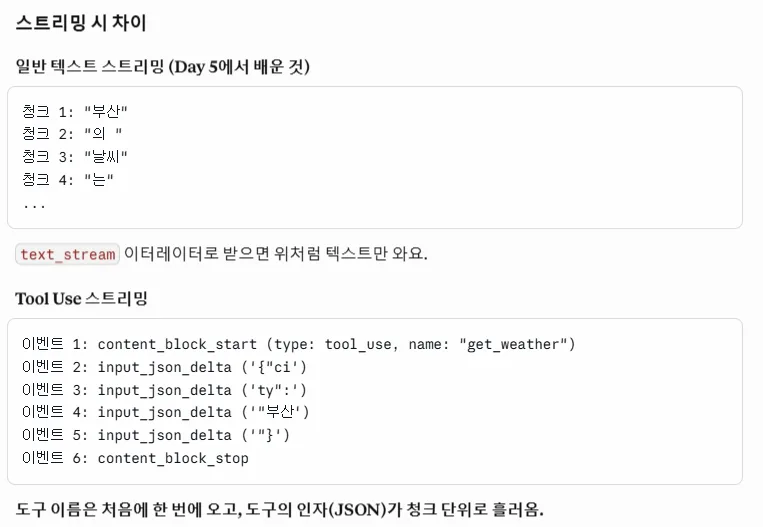
Key summary:
- Regular text streaming:
text_streamdelivers text chunks as-is. In the example image above — word fragments like"부산","의 ","날씨","는"arrive one after another. - Tool Use streaming: the event flow is different.
→ The tool name arrives all at once at the start, and the tool’s arguments (a JSON string) stream in chunk by chunk.content_block_start (type: tool_use, name: "get_weather") input_json_delta ('{"ci') input_json_delta ('ty":') input_json_delta ('"부산') input_json_delta ('"}') content_block_stop
Since the JSON arrives split into pieces, the client has to accumulate them to form the complete JSON. Text can just be accumulated token by token, but since Tool Use has to preserve valid JSON format, it makes more sense to receive everything first and then parse it all at once.
(Tool Use itself will be covered in the next study session. Here I’m only noting that “the streaming event flow is different.”)
Summary
- The essence of streaming isn’t the “effect” — it’s reducing TTFT. Even with the same total time, users perceive it as faster.
- The possibility of interruption is also an important side effect — users can stop once they’re satisfied.
- Streaming responses follow a lifecycle of message start → block start → deltas → block stop → message stop.
- In Tool Use streaming, the tool name arrives all at once while the arguments (JSON) stream in as chunks → the receiving side needs to handle them differently.
Things to study further
1. How to measure TTFT
- Directly time the TTFT difference between non-streaming and streaming with a stopwatch
- Call the same prompt 100 times and compare the distribution (mean/median/p95)
- How TTFT changes depending on model size (Opus / Sonnet / Haiku)
- Reference: Anthropic Streaming Messages docs
2. A full survey of event types
message_start,content_block_start,content_block_delta,content_block_stop,message_delta,message_stop,ping,error— when is each used- What does
message_deltacontain (metadata like usage info?) - What events arrive when an error occurs — patterns for safely disconnecting on the client side
3. Tool Use streaming in detail (next session)
- Why
input_json_deltaarrives as partial JSON fragments (because it’s split by the model’s internal token units) - Patterns for safely accumulating chunks into complete JSON
- How events interleave when multiple tool calls are included in a single response (parallel tool calls)
4. Using streaming together with Prompt Caching
- Does TTFT shrink further on a cache hit? By how much?
- How is the cached portion represented in streaming events (does it arrive all at once? or still as chunks?)
5. UX best practices
- How to cleanly handle a user pressing stop mid-stream
- How to render streaming responses smoothly on mobile (auto-scroll, controlling flicker)
- Handling network disconnects/reconnects during streaming
Reflection
At first I thought “isn’t this just used because it looks nice,” but once I learned that a single metric like TTFT can make the same response feel like a different product, my perspective changed. When it’s hard to actually reduce latency, moving toward reducing the latency the user perceives — this seems to be an important axis of LLM service design.
Going into Tool Use next session, I should try writing code myself for how to safely merge the partial JSON received from streaming and connect it to an actual function call.