
I’ve decided to study by feature now. I’m planning to dig into things like login/authentication, reservations/inventory, payments, and likes/view counts one at a time. For this first installment, I’m covering session-based authentication within login/authentication.
Table of contents
Open Table of contents
AuthN vs AuthZ
First, I separated two terms that are easy to confuse.
- Authentication (authN) — confirming who you are. Login falls under this. It uses an identity like an ID/password to determine “whether this person really is who they claim to be.”
- Authorization (authZ) — confirming permissions. This determines things like whether a logged-in user can access an admin page or delete someone else’s post.
Naturally, authentication comes first, then authorization. In English, these are abbreviated as authN and authZ respectively. (It’s a neat distinction — N first, Z second.)
The fundamental problem: HTTP doesn’t remember
HTTP is stateless. In simple terms, it doesn’t remember previous interactions. Each request is unaware of the others, so even if someone who just logged in sends the next request, the server perceives it as a request from a stranger.
Yet on the web, once we log in, we keep receiving our own information. How does the server remember that I logged in? The two approaches that solve this problem are the session method and the token (JWT) method. Today I’m covering sessions.
How session-based authentication works
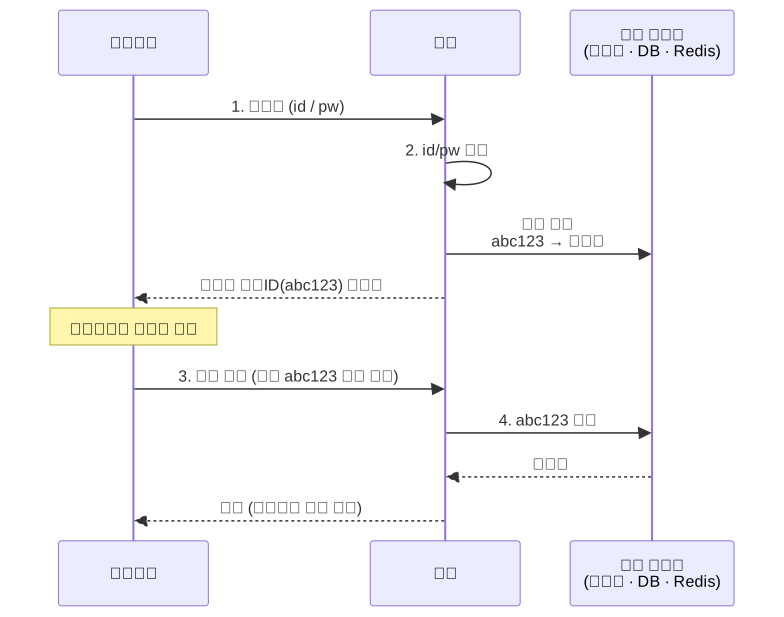
In the session method, once login succeeds, the server issues a kind of ID badge and hands it over, while also keeping a copy for itself.
- Login: The user sends their id/pw
- Server: Verifies the id/pw → if correct, creates a session
- Stores
sessionID: abc123 → John Smithin server memory (or a DB/Redis) - Sends the session ID (
abc123) back to the user as a cookie
- Stores
- Subsequent requests: The browser automatically sends the cookie (
abc123) along with each request - Server: Sees
abc123in the cookie and recognizes “ah, this is John Smith”
The key point is that the server remembers the session information. The session ID is just like a locker number tag — the server is the one holding onto who’s who. The user just carries around the number tag (session ID) with each request, and the server opens the matching locker (user info) using that number.
What’s important here is that the browser automatically attaches the cookie to every request. So after login, the session ID automatically tags along on every request, and the server can identify the sender each time.
In Spring — Spring Security
In practice, people apparently don’t implement authentication entirely from scratch. Instead, they use a library called Spring Security, which is the de facto standard for authentication/authorization.
Add the dependency to build.gradle.
implementation 'org.springframework.boot:spring-boot-starter-security'Just adding this makes Spring start requiring login for every request. The core configuration class looks like this.
@Configuration
public class SecurityConfig {

    @Bean
    public SecurityFilterChain filterChain(HttpSecurity http) throws Exception {
        http
            .authorizeHttpRequests(auth -> auth
                .requestMatchers("/login", "/signup").permitAll()  // 이건 누구나
                .anyRequest().authenticated()                       // 나머진 로그인 필요
            )
            .formLogin(form -> form.permitAll());  // 기본 로그인 폼 사용

        return http.build();
    }

    @Bean
    public PasswordEncoder passwordEncoder() {
        return new BCryptPasswordEncoder();  // 비밀번호 해싱용 — 아래에서 설명
    }
}
When a SecurityFilterChain exists, it checks whether a request is authenticated before it reaches the controller. If the check fails, the request never makes it to the controller and gets redirected to the login page instead. authorizeHttpRequests manages authorization — since it would be contradictory to require login just to reach the login or signup pages, those are opened up to everyone with permitAll. With Spring Security, session management tasks like issuing cookies, storing sessions, and validating them are all handled automatically.
Never store passwords as plain text
You must never store passwords in the DB as plain text. If you do and the DB gets breached, every user’s password is exposed as-is. Since many people reuse the same password across multiple sites, the damage isn’t limited to just that one site.
That’s why passwords are stored after hashing. Hashing is a one-way transformation that cannot be reversed back to the original value.
Here’s the point where I got stuck: “If it’s encrypted, don’t you need to decrypt it to compare?” No. You hash the password entered at login the same way, then compare it against the stored hash value. That way, the server can verify identity without ever knowing the original password.
This is what BCryptPasswordEncoder handles. BCrypt is the standard algorithm for password hashing.
// 회원가입 시: 비밀번호 해싱해서 저장
String hashed = passwordEncoder.encode("password123");
// → "$2a$10$..." 같은 해시가 저장됨

// 로그인 시: 입력값과 저장된 해시 비교
boolean matches = passwordEncoder.matches("password123", hashed);
// → true (원본을 몰라도 일치 여부 확인 가능)
There’s also simple hashing like SHA-256, but the reason to specifically use BCrypt is that BCrypt is deliberately designed to be slow. Regular hashes are too fast, making brute-force attacks easy for hackers. If it’s slow, each attempt takes time, which drastically raises the cost of an attack.
I learned for the first time today that passwords are stored as hashes. I’ve always used a password I don’t normally use when signing up for sketchy sites — turns out that habit is worth keeping. Hashing only protects you if the site implements it properly. The sketchy sites are exactly the ones likely to store passwords as plain text or use weak hashing, which is all the more reason to use a unique password for them. This is why “these days everyone hashes passwords, so it should be fine” is a dangerous assumption.
Weaknesses of the session approach
Sessions work well, but they have weaknesses.
Weakness 1 — the server has to remember every session. This is fine when there are few users, but as the number grows, the server has to hold onto all those sessions, which creates a significant memory burden.
Weakness 2 — what if there are multiple servers? These days, it’s common to have multiple servers to distribute load. But if a login session exists only on Server A, and the next request goes to Server B, Server B won’t recognize this user. Solving this requires putting sessions in a shared store like Redis, which adds complexity.
This is why the JWT method emerged. It eliminates the need for the server to remember anything by embedding the information directly in the ID badge itself. (This is the opposite approach from sessions, so I’ll leave it as a separate topic to dig into later.)
Reflection
If I had to sum up what I learned today in one line — if I had simply said “implement a login feature,” Claude would have written it out using either sessions or JWT without me asking. And I would have used it without ever understanding it, for the rest of my life.
I plan to keep studying this way — breaking down “what do I need to think through to build this feature, and what library actually implements it.” The more AI writes code for us, the more value there is in understanding what it wrote.
Things to study further
- JWT method — stateless authentication where the server doesn’t remember state. The trade-offs (server burden vs. difficulty of token invalidation, etc.) between embedding information in the ID badge (token) versus the session approach.
- Salt — the random value mixed into a BCrypt hash (
$2a$10$...). A mechanism that makes hashes differ even for the same password, preventing rainbow table attacks. Also want to look into what$10$means (work factor). - Putting sessions in a shared store — how a Redis session store actually gets connected when there are multiple servers.
- Spring Security filter chain — the actual order behind “checks happen before the controller.” Which filters run in what order.
- Actual implementation of authZ — today only covered “whether logged in or not.” Next, how to implement role-based restrictions like “admin only” access.