
It’s been a while since I last wrote on the blog. I started a new job this week, and I wanted to write about what I study after work, but I spent most of my time getting up to speed on the domain and the tech stack for the job, so I didn’t get much separate study done. I need to study and work out, and I never seem to have enough time for both.
Table of contents
Open Table of contents
Study order
I’m getting into graph RAG, so I laid out a plan for it.

I put in step 2 because I’m curious about it. I’ve built a blog QA system with Chroma before, and back then the vector DB was a separate component. I still don’t know why you’d bother putting vectors and a graph into the same DB.
Step 4’s vLLM is also new to me. So far I’ve only used the Anthropic API — I’ve never served a model myself.
Today is day 1, so I’m covering Neo4j graph basics.
Installing Neo4j — the Aura free tier
Neo4j comes in two flavors.
- Neo4j Desktop: for local development
- Neo4j Aura: the cloud version
I was recommended the Aura free tier, so I made an account and created a free instance. I signed up with my GitHub account.
During sign-up, there’s a step where you pick a Region. For Cloud, the options are AWS / Azure / GCP, but the only Korean server is on Azure. At this point I accidentally clicked on something that said “another~” — it was a button for viewing other plans. After the screen changed, I clicked Free and just hit Create, so the instance was created without a region set. It’s just for learning, so I figured it wouldn’t matter.
After creating the instance, it took a while for the status to change to Running.
How is a graph DB different from a relational DB
- Relational DB (MySQL, etc.): relationships are expressed with tables + foreign keys. To find out “which equipment does Line A use,” you need a
JOIN - Graph DB (Neo4j): “which equipment does Line A use” is stored directly as an arrow (edge) from the start, so you follow it without any
JOIN

Apparently 3-hop and 5-hop relationship queries are much faster and more intuitive this way. I haven’t actually measured how much faster yet.
First Cypher query
I started by looking at what Cypher is. Cypher is Neo4j’s query language. Just as you use SQL for a relational DB, you use Cypher for Neo4j, a graph DB.
The SQL I learned when doing Spring Boot looked like this.
SELECT * FROM line WHERE name = '라인1';Cypher deals with nodes and relationships, not tables. The core idea of Cypher syntax is that you write it like you’re drawing a picture.
(l:Line {name: '라인1'})-[:USES]->(e:Equipment {name: '가열로'})Apparently if you can read the code, you can see the picture.
(라인 1) --USES--> (가열로)Trying it myself
To run a Cypher query on the instance I had just created, I first needed to connect. I went into the Query tab in Studio and connected to the instance I’d made earlier from the top of the screen. Then I clicked Create query and typed in a query.
Creating nodes
CREATE (l:Line {name: '열간단조 라인1', rated_power_kw: 300})
CREATE (e:Equipment {name: '가열로', type: '가열'})
CREATE (a:Alarm {message: '온도 초과', severity: 'high', timestamp: '2026-09-01'})
CREATE creates a node in a graph DB — apparently it’s best understood as being like SQL’s INSERT. Breaking it down piece by piece:
- In
(l:Line {...}), the parentheses indicate a node lacts like an aliasLineis called a label, which plays the role of a table name in SQL- What’s inside the curly braces is the node’s properties
I used the command above to create three nodes.
Creating relationships
MATCH (l:Line {name: '열간단조 라인1'}), (e:Equipment {name: '가열로'})
CREATE (l)-[:USES]->(e)
MATCH is the equivalent of SQL’s SELECT ... WHERE. [:USES] represents a relationship, and the arrow indicates direction. Interpreting the query above, it means drawing a relationship line saying l USES e.
MATCH (e:Equipment {name: '가열로'}), (a:Alarm {message: '온도 초과'})
CREATE (e)-[:TRIGGERED]->(a)
This time I used [:TRIGGERED] instead of [:USES]. It turns out USES is something you name however you like, just like a column name. By convention, relationships are written in uppercase with underscores, and node labels are written in PascalCase.
Querying
MATCH (l:Line {name: '열간단조 라인1'})-[:USES]->(e:Equipment)-[:TRIGGERED]->(a:Alarm)
RETURN l.name, e.name, a.message, a.severity
I looked at what’s different from what I ran before. The earlier [:USES] and [:TRIGGERED] were creating relationships, whereas this MATCH statement is a query asking the DB to find and show this pattern if it exists.
I got this kind of result.

The graph didn’t show up
But the graph view didn’t appear. Only a table showed up.
The result above was just properties pulled out separately, which is why the graph didn’t show up. l.name is just a string, so there’s nothing for Studio to draw. You have to return the nodes and relationships themselves for the graph view to appear.
MATCH path = (l:Line {name: '열간단조 라인1'})-[:USES]->(e:Equipment)-[:TRIGGERED]->(a:Alarm)
RETURN path
I added path = to the MATCH to name the entire path, and returned that path as-is. This time, the graph view showed up.
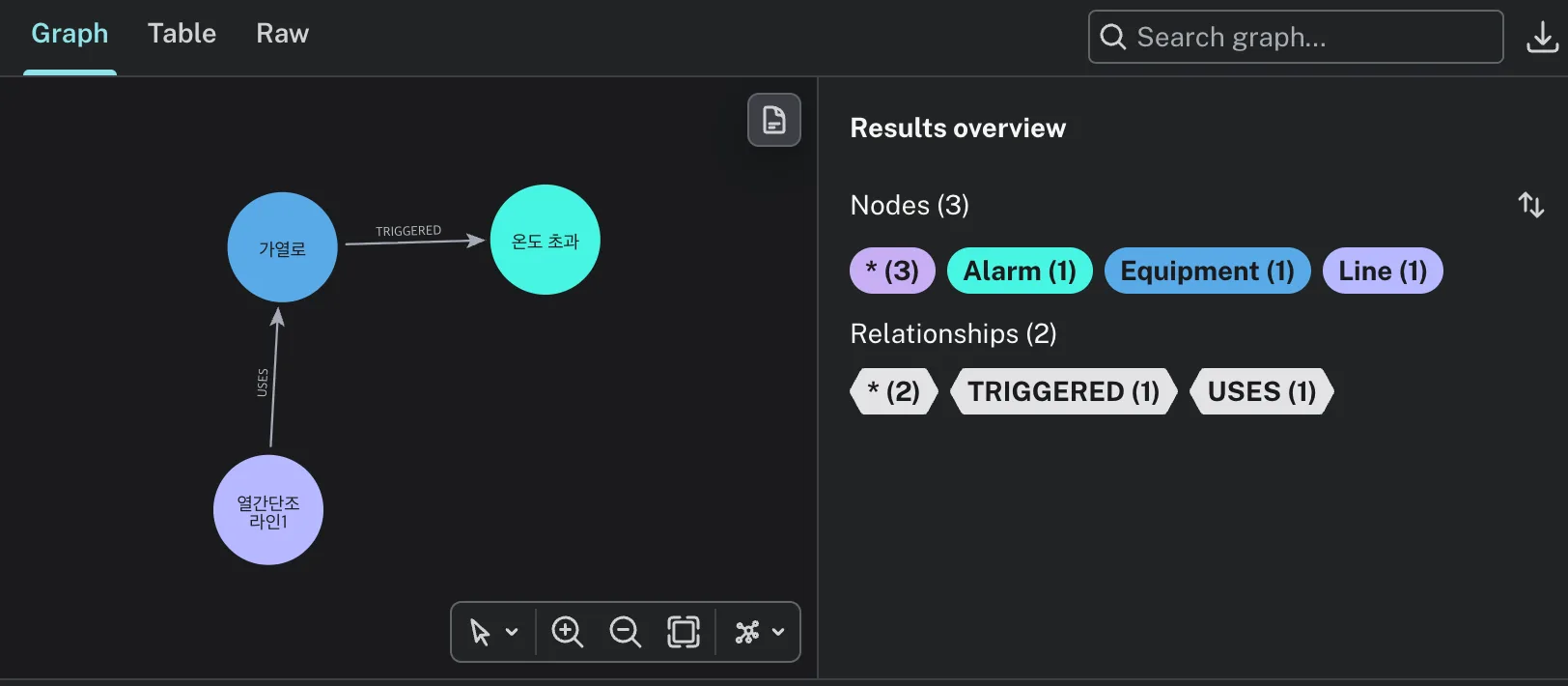
It wasn’t that the query was wrong — it was about what you pass to RETURN. With the same MATCH, pulling out properties gives you a table, while pulling out nodes or a path gives you a graph.
I also looked into when to use Table and when to use Graph.
| Purpose | What you pass to RETURN | View |
|---|---|---|
| Extracting only values | l.name, a.severity | Table |
| Viewing the nodes/relationships themselves | l, e, a or path | Graph |
That’s as far as I got today. Studying is fun, but turning what I study into a written record turns out to be really hard.
Things to study further
- How much of a real difference is there between 3
JOINs and a 3-hop traversal? — I just took “much faster” at face value without measuring it myself. I’d like to see whether the difference holds even with small amounts of data, and at what scale the gap starts to widen → Neo4j: Graph database concepts - Why put vectors and a graph into the same DB? — This is the question I noted for step 2 of the roadmap. What’s the advantage compared to using Chroma separately? → Neo4j: Vector indexes
- The difference between
MERGEandCREATE— Today I only usedCREATE. I’m curious whether creating the same node twice results in duplicates piling up → Cypher: MERGE - Can relationships have properties too? — I gave nodes properties using curly braces, but I wonder if you can attach things like a timestamp to a relationship like
[:TRIGGERED] - Can you change an instance’s Region later? — I created mine without setting the region. I brushed it off since it’s just for learning, but it’s probably worth checking whether I can migrate it or whether I’d need to recreate it from scratch