
Today I studied Neo4j’s vector index. I had previously done vector search with Chroma, and this seems to be the same thing done inside a graph DB. In my last post, I left the question “why put vectors and graphs in the same DB” unanswered — this post picks up that thread.
Table of contents
Open Table of contents
Creating a vector index
First, I create a vector index.
CREATE VECTOR INDEX equipmentEmbeddings
FOR (n:Equipment)
ON (n.embedding)
OPTIONS {indexConfig: {
  `vector.dimensions`: 1536,
  `vector.similarity_function`: 'cosine'
}}
Looking at the query, I immediately noticed the 1536 dimensions and cosine similarity. The index name equipmentEmbeddings is something the user chooses.
What surprised me was the n:Equipment part. n is used like a local variable, referring to something only within this query. So reading the whole thing: this creates a vector index on the embedding property of Equipment nodes, using 1536 dimensions and cosine similarity.
The number 1536 comes from the embedding model. Looking at the code, it was using text-embedding-3-small, and when I later printed out the actual stored vector length, it was indeed 1536.
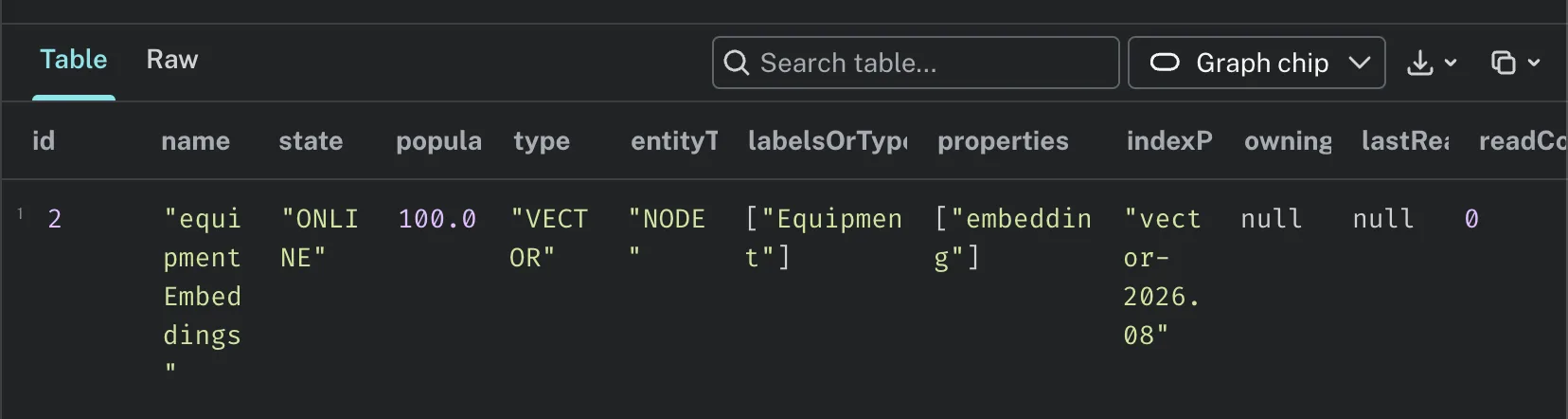
I used SHOW VECTOR INDEXES to check that the index I just created showed up in the list.
Setting up the project
I set up the environment with uv. I went uv init → uv venv → source .venv/bin/activate → uv pip install, in that order. Since I’m on a Mac, I had to use source .venv/bin/activate like on Linux.
I created a .env file and put in the Neo4j URI, username, password I had saved, along with the OpenAI API key. Then I created add_embeddings.py. The code is up on the ai-study repository.
I put the instance name in the username field
I got an error on the first run. The message said permission/access denied, so I suspected I had entered something wrong in .env.
I had put the instance’s name in the USERNAME field. Once I replaced it with the instance ID, the embedding succeeded.
Naturally, the embeddings get stored in Neo4j Aura DB. I ran the following query to check.
MATCH (e:Equipment {name: '가열로'})
RETURN e.name, e.description, size(e.embedding) AS embedding_dimensions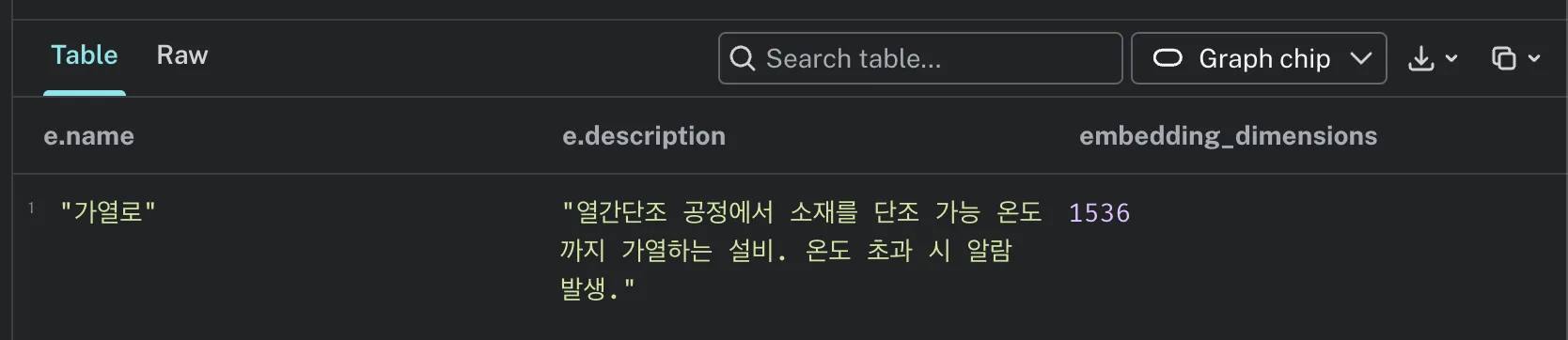
I could see the result of embedding the description text.
Embeddings attach to the node
There’s something worth pointing out here. In Chroma, embeddings were stored separately in a collection, but in Neo4j, they attach as a property of the node. That means vectors and graph structure can coexist on the same node.

Vector search — the question also needs to be embedded
Next is vector search. Since the search code was in a separate file, I thought about just appending it to the embedding code, but I had to split it into a separate file. Along the way, I created two more data entries and added two more nodes in Neo4j Browser. Since I added nodes, I re-ran the embedding code to generate their vectors.
One thing I learned: you need to generate an embedding at search time too. The question also has to be turned into a vector so it can be compared by similarity.
Queries in Browser vs. queries in code
As I was writing the code, I noticed the queries were all embedded inside functions. I wondered — if all the queries live inside the script, does that mean I no longer need to go into the instance’s query tab and type things directly?
The conclusion is that both send queries to the same DB, but they serve different purposes.
| When to use | |
|---|---|
| Neo4j Browser | When exploring, when you want to check results visually |
| Python code | When the logic is settled and needs to run repeatedly |
I was just trying out a few queries in Browser to understand things — to actually run this as a real service, you need to have it set up to run through Python.
Reading the SEARCH query
The search function contained this query.
SEARCH equipmentEmbeddings NEAREST $k NODES TO $embedding
        YIELD node, score
        RETURN node.name AS name, node.description AS description, score
Just reading the query, my guess is: find the k nodes closest to the question vector in the equipmentEmbeddings vector index, and pull the name, description, and score from those nodes.
SEARCH is different from MATCH. MATCH asks for something if this relationship exists, whereas SEARCH asks you to find the closest items via a vector index.
YIELD was the hardest to grasp at first, but simply put, it’s a clause that declares which results from the search to bring back. It means you’ll use whatever you bring back in the RETURN on the next line.
SEARCH was a syntax error
But I got an error.
neo4j.exceptions.CypherSyntaxError: {neo4j_code: Neo.ClientError.Statement.SyntaxError} {message: Invalid input 'SEARCH': expected 'ALTER', 'ORDER BY', 'CALL', 'CREATE', 'LOAD CSV', 'START DATABASE', 'STOP DATABASE', 'DEALLOCATE', 'DELETE', 'DENY', 'DETACH', 'DROP', 'DRYRUN', 'FILTER', 'FINISH', 'FOR', 'FOREACH', 'GRANT', 'INSERT', 'LET', 'LIMIT', 'MATCH', 'MERGE', 'NODETACH', 'OFFSET', 'OPTIONAL', 'REALLOCATE', 'REMOVE', 'RENAME', 'RETURN', 'REVOKE', 'ENABLESERVER', 'SET', 'SHOW', 'SKIP', 'TERMINATE', 'UNWIND', 'USE', 'WHEN', 'WITH' or '{' (line 2, column 9 (offset: 9))
"        SEARCH equipmentEmbeddings NEAREST $k NODES TO $embedding"
         ^} {gql_status: 42001} {gql_status_description: error: syntax error or access rule violation - invalid syntax}
It wasn’t recognizing SEARCH as a keyword at all. Apparently, this is a problem where the SEARCH keyword from Cypher 25 isn’t supported yet — in other words, it was using an older version of the syntax. Switching to the older compatible syntax solved it.
CALL db.index.vector.queryNodes('equipmentEmbeddings', $k, $embedding)
        YIELD node, score
        RETURN node.name AS name, node.description AS description, score
CALL db.index.vector.queryNodes replaced the SEARCH syntax.
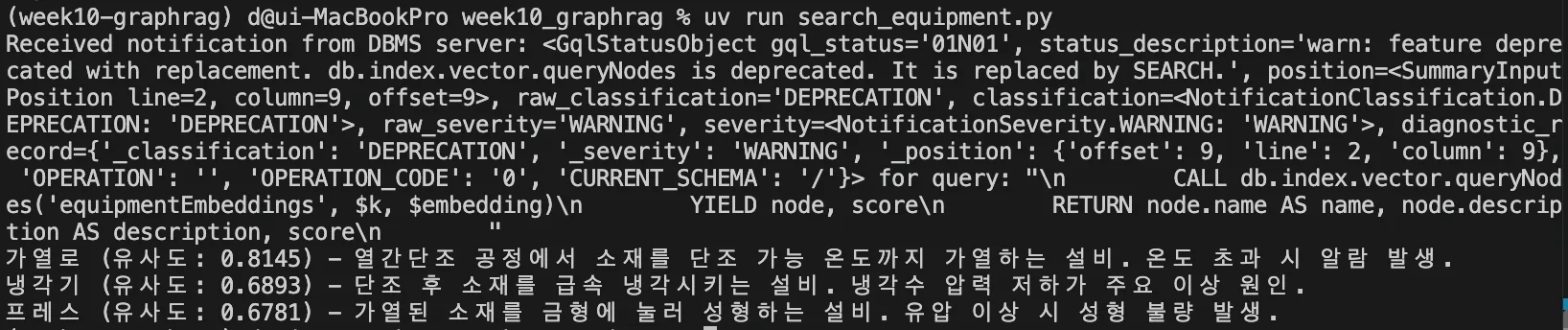
The question was “equipment that triggers alarms due to temperature issues.” So the Furnace came back as the highest similarity match. That’s the correct result.
Furnace (similarity: 0.8145) - Equipment that heats material to a forgeable temperature during the hot forging process. Triggers an alarm when the temperature is exceeded.
Cooler (similarity: 0.6893) - Equipment that rapidly cools material after forging. Low coolant pressure is the main cause of anomalies.
Press (similarity: 0.6781) - Equipment that shapes heated material by pressing it into a die. Hydraulic issues cause molding defects.
Along with this, a warning came up saying db.index.vector.queryNodes is deprecated. I figure I can just take this as a legacy part that will need migration later and move on.
But reading the warning message again, something’s off.
db.index.vector.queryNodes is deprecated. It is replaced by SEARCH.The same server rejects SEARCH as a syntax error, while also telling me to switch queryNodes to SEARCH. If the server had no idea what SEARCH was, this warning shouldn’t be showing up at all. I haven’t figured out why this happens yet.
Finding with vectors, expanding with the graph
Up to this point, it’s basically the same thing I did with Chroma. This time, I tried attaching graph relationships to the vector search.
I added a function to search_equipment.py so that it finds similar equipment via vector search and, in the same step, pulls in the alarms that equipment triggered.
CALL db.index.vector.queryNodes('equipmentEmbeddings', $k, $embedding)
        YIELD node AS equip, score
        OPTIONAL MATCH (equip)-[:TRIGGERED]->(a:Alarm)
        RETURN equip.name AS name, score,
               collect(a.message) AS related_alarms
Two things I hadn’t seen before were added to the query.
OPTIONAL MATCH: With a regularMATCH, if there’s no match, that entire row disappears from the result.OPTIONAL MATCHstill returns the result even without a match, filling the missing part withnullcollect(): If one piece of equipment triggers multiple alarms, the result would come back as multiple rows — this collapses them into a single list


Furnace (similarity: 0.8145) - Related alarms: ['Temperature Exceeded']
Cooler (similarity: 0.6893) - Related alarms: []
Press (similarity: 0.6781) - Related alarms: []
Nodes with a relationship defined show their alarms, but rows aren’t omitted just because the relationship is empty.
Something else worth noting: the Cooler and Press came back as [], not [null]. OPTIONAL MATCH fills a with null, but collect() excludes null when collecting, so the result ends up as an empty list.
With vector search alone, all I could tell was that the Furnace looked relevant. Once I looked at the graph relationships too, I was able to pull back exactly which alarms it had triggered, all in one go, ready to hand off to the LLM. This was the answer to the “why put them in the same DB” question I left open in my last post.
Things to study further
- Why does the server reject
SEARCHwhile warning me to switch toSEARCH? — Given that there’s a name like Cypher 25, it seems Cypher has language versions. I need to check whether you can pick a version per query, and what the instance’s default is → Neo4j: Vector indexes - Why is Aura’s username the instance ID? — I put in the name and got access denied. I want to sort out where the instance name and the instance ID are each actually used
- What happens to the index if you change the embedding model? — I fixed the dimensions at 1536 when creating the index. I’m curious whether switching to a model with different dimensions means you have to recreate the index
- When would you use a similarity function other than
cosine? — It seemsvector.similarity_functionaccepts other values too; I want to know what they are and on what basis to choose - Where should the similarity score cutoff be? — The Furnace scored 0.8145, but the seemingly unrelated Cooler and Press also came back in the 0.68 range. If it always fills out
kresults regardless, there probably needs to be some kind of threshold. Worth revisiting alongside my earlier post where I measured recall@k