
In MCP Study #1 (Inspector) and #2 (Claude Desktop), I only covered Tools. Today I’ll cover the remaining two components — Resources / Prompts — plus LangGraph integration.
Table of contents
Open Table of contents
The three components of MCP — again
| Component | Definition |
|---|---|
| Tools | Functions the LLM calls |
| Resources | Data / files the LLM can read |
| Prompts | Predefined prompt templates |
Looking at just this doesn’t make the difference very clear. I need a more concrete comparison.
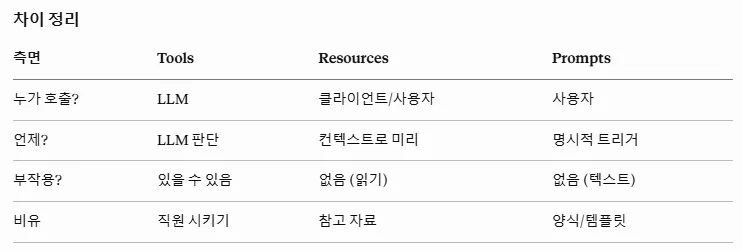
| Aspect | Tools | Resources | Prompts |
|---|---|---|---|
| Who calls it? | LLM | Client / user | User |
| When? | LLM decides | Pre-loaded as context | Explicit trigger |
| Side effects? | Possible | None (read-only) | None (text) |
| Analogy | Delegating to staff | Reference material | Forms / templates |
The key difference (in one line)
- Resources = context that is always provided in the background (read-only)
- Tools = data actively fetched when needed (has call cost / side effects)
- Prompts = forms / templates explicitly triggered by the user
Implementation — @mcp.resource() / @mcp.prompt()
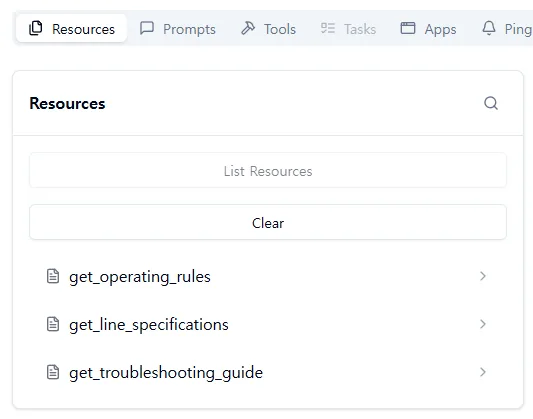
Resources are implemented with @mcp.resource("..."). They’re exposed via a URI pattern:
@mcp.resource("config://operating-rules")
def get_operating_rules() -> str:
    """공장 운영 규정 — 백그라운드 컨텍스트."""
    return "..."  # 텍스트 그대로 반환
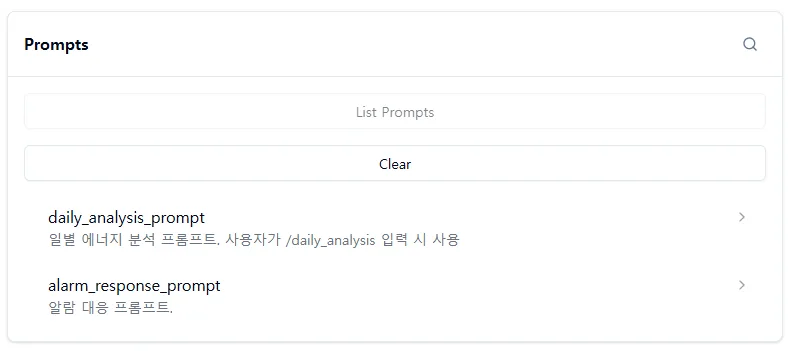
Prompts are implemented with @mcp.prompt(). You can predefine what procedure to follow for processing input data and what format to output the result in. It’s a similar concept to writing a system prompt in advance.
@mcp.prompt()
def daily_analysis_prompt(date: str) -> str:
    """일별 에너지 분석 프롬프트 — /daily_analysis 입력 시 사용."""
    return f"{date} 자료를 분석해 다음 형식으로 정리해줘..."
Checking with Inspector
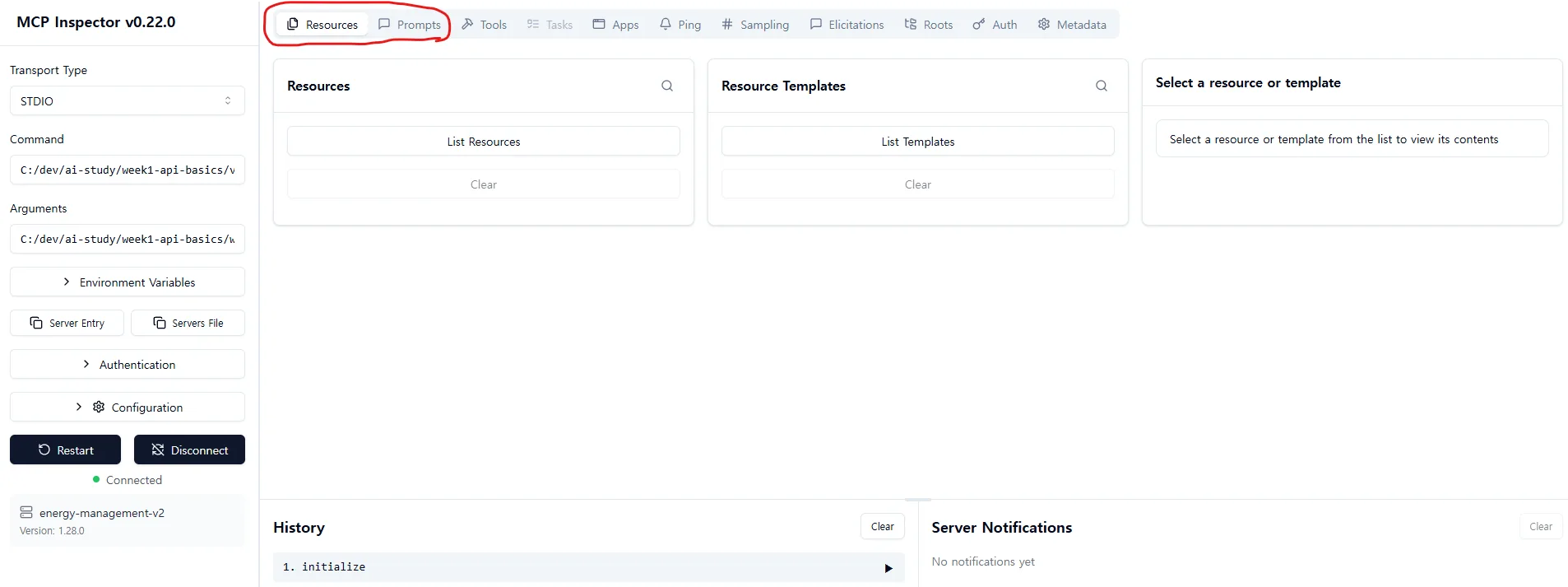
The Resources / Prompts tabs are now active. Previously there were only Tools, but the new server has all three.
Checking in Claude Desktop too
I added the new server to the config registered in #2 and restarted:
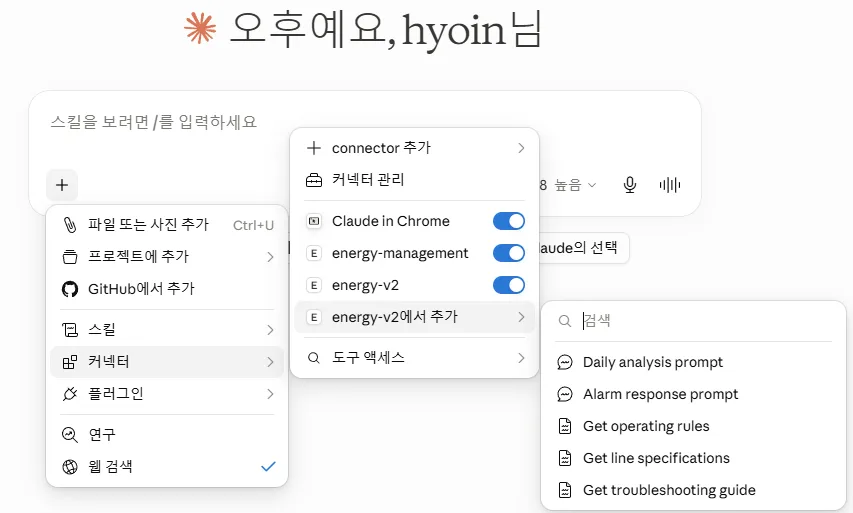
Click the + button in the chat window → Connectors → toggle on energy-v2, and the registered Resources / Prompts appear as a menu on the right. Clicking an item either copies the prompt into the chat or brings up a form where you can enter parameters directly.
Integrating with LangGraph — langchain-mcp-adapters
Now I’ll call the MCP server I built from LangGraph.
pip install langchain-mcp-adaptersThis is a library supported by LangChain — it automatically converts MCP server tools into LangChain’s @tool format. No need to write an adapter yourself.
Setup flow
MCP 클라이언트 셋업
  ↓
LangGraph State + 노드 함수 정의 (asyncio)
  ↓
도구 로드 → ainvoke
The pattern is the same as the previous LangGraph series, except asyncio has been added.
asyncio — a nice callback to a data logger project from my previous company
Seeing asyncio reminded me of building rain gauge data logger software at my previous company. I used coroutines + asyncio there to make sure no incoming sensor values were dropped. That was the first time I learned coroutines, so it was nice to see them again.
Why ainvoke is needed
While typing out the code, I came across a method called ainvoke. It’s the async version of invoke. I was curious why LangChain supports asynchronous execution, and the answer turned out to be simple:
MCP communication itself is asynchronous. Both stdio and SSE are based on asynchronous I/O. So LangGraph also needs to use
ainvoke, the asynchronous method.
If you called invoke (synchronous) instead, you’d end up with the awkward pattern of wrapping asynchronous communication in a synchronous call. The reason LangChain provides both is so that the caller can choose based on their own context.
Execution result
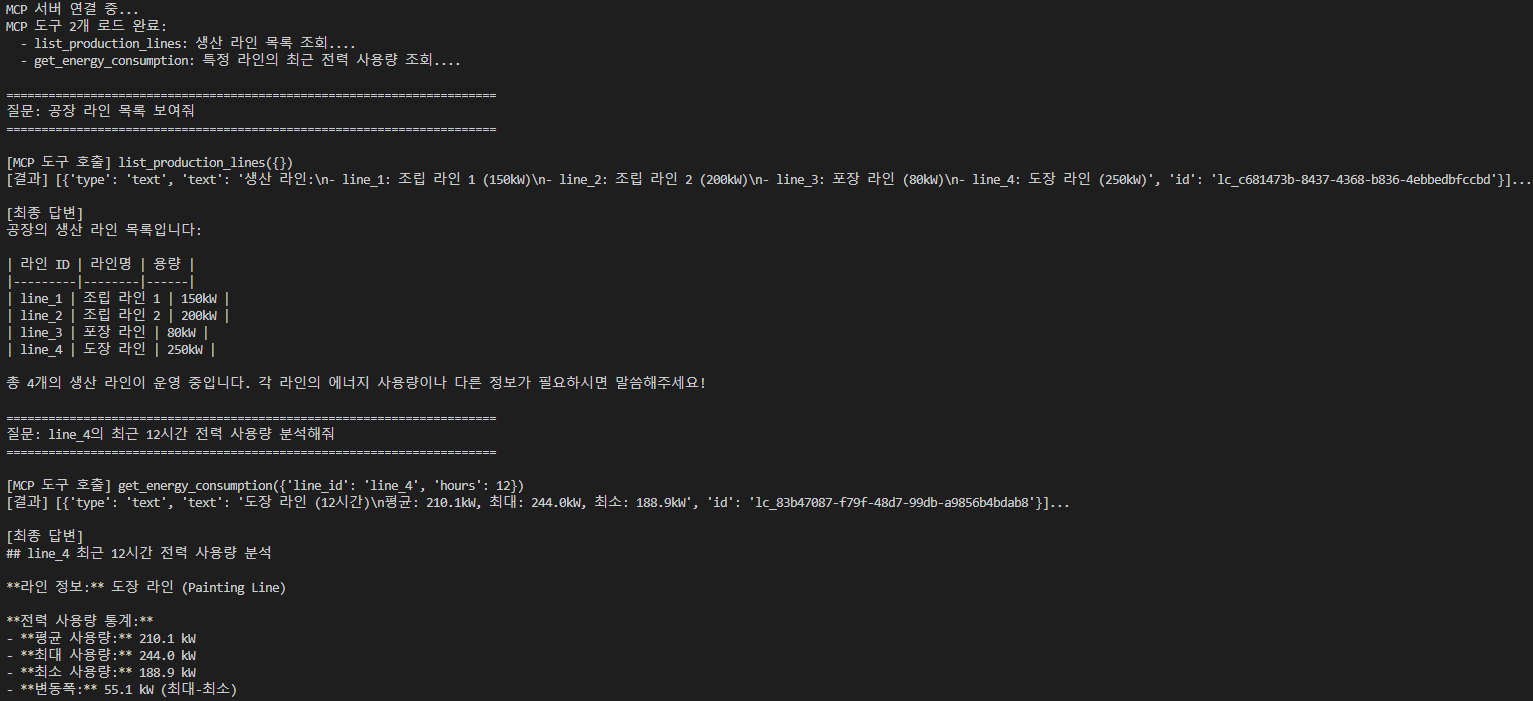
It calls list_production_lines() and then get_energy_consumption(line_4, 12h) in order, automatically. The result is formatted into a markdown table for the response.
The secret behind how MultiServerMCPClient loads servers as-is
An interesting part — the MCP server code hasn’t changed a single line, yet LangChain loads it as-is via MultiServerMCPClient.
Why this is possible = because the implementation follows the MCP standard. As long as the server follows the stdio / message format standard, any client can pick it up and use it.
This is essentially seeing, in practice, how the “universal standard” row of the “Tool Use vs MCP” table I compared in #1 actually manifests.
Integrating Resources too — domain knowledge as a system prompt
Rather than just loading Tools, I also pull in Resources and apply them to the system prompt.
async with mcp_client.session(...) as session:
    resources = await session.list_resources()
    context = ""
    for r in resources:
        content = await session.read_resource(r.uri)
        context += content.text + "\n"
    return context  # → 시스템 프롬프트에 주입
I use async with to receive the resources and bundle them into context, then proceed as usual: LLM setup → node definitions → edge connections → ainvoke.
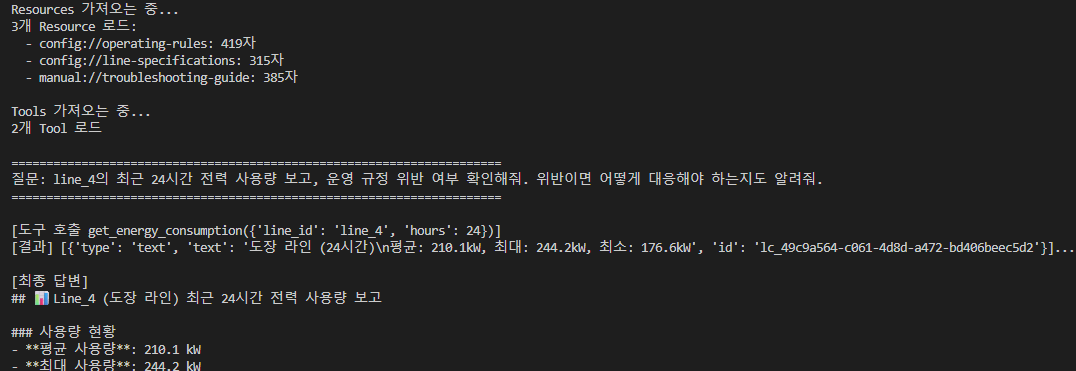
At the start, it loads 3 Resources (operating-rules 419 chars + line-specifications 315 chars + troubleshooting-guide 385 chars) before answering the question.
With Resources vs without
The biggest difference is the quality of answers that reflect domain knowledge.
Even with the same data, questions requiring domain-context-aware analysis, like “check for operating rule violations” or “suggest a response,” become possible. Without Resources, the answer stays at the level of a simple data summary.
Retrospective
I’ve now touched all three components of MCP and combined them with LangGraph. To summarize:
- Division of labor between Tools / Resources / Prompts — “actively called / background context / user-triggered form.” Even for the same information, you need to decide at the design stage which format is the natural fit for exposing it.
- MCP communication is asynchronous —
ainvokeis the natural choice. If you’ve only ever worked with synchronous code, you’ll need to brush up onasyncioat some point. - The power of following the MCP standard — without changing the server code at all, it works as-is across Inspector, Claude Desktop, and LangGraph. Once you build a tool, it becomes independent of which client is used.
- Resources are a natural container for injecting domain knowledge — rather than hardcoding it into a system prompt, separating it out as an MCP Resource lets the server, client, and other agents all share the same context.
What to study further
1. MCP server depth — a side-project track
- Not just simple demos, but real usage scenarios (e.g., exposing my FEMS RAG as an MCP server)
- Operational issues like auth / permissions / rate limits
- Dynamic URIs like Resource templates (
config://users/{user_id})
2. Evaluating RAG responses / agent systems
- How to measure the responses of the systems I’ve built so far (FEMS / LangGraph / MCP)
- Applying the same principle from the quant post’s “gut-feel benchmarking → numerical benchmarking”
- Frameworks like RAGAS / TruLens / DeepEval
- Automatically building evaluation sets + managing golden answers
3. Internals of langchain-mcp-adapters
- The mechanism behind converting MCP tools → LangChain
@tool - Input schema / output schema mapping rules
- Error / timeout / retry policies
- Handling tool conflicts when combining multiple MCP servers at once
4. Reviewing asyncio + coroutine fundamentals
async with/async for/gather/as_completed- Patterns for calling async code from within synchronous code (
asyncio.run) - Similarities and differences between the coroutines I used for the data logger (rain gauge) at my previous company and LLM tool calls
5. The boundary between Resources and RAG
- Small domain knowledge → inject via Resources into the system prompt
- Large corpora → search via RAG
- The gray zone in between — where does a ~50KB guideline document belong
- The trade-off between token cost and retrieval latency
6. Operational patterns for Prompts
- User triggers like slash commands (/daily_analysis)
- Parameter validation / defaults / multi-language support
- Workflows combining Prompts and Resources (specifying which Resource a Prompt should pull in together)