
This post is one branch of my Java / Spring Boot backend learning path. In Spring Boot #2 (CRUD with REST API · Layered Architecture), I handled CRUD with an in-memory List. This post is the step where I get comfortable with the DB and SQL itself before moving on to a real database. The PostgreSQL knowledge I pick up here connects back to Java (JPA) in Spring Boot #3 (Connecting PostgreSQL with JPA).
Today I learned the basics of PostgreSQL and SQL. Until now I’d been working in a WSL2 environment, but today I picked up a used MacBook and studied on macOS instead. I’d used SQLite here and there before, but this was my first time with PostgreSQL, so the syntax felt a bit unfamiliar.
Table of contents
Open Table of contents
Creating a database and connecting
After installing PostgreSQL, the first thing I did was CREATE. I created a database, connected to it with \c, and then created a table inside it.
CREATE TABLE todos (
    id BIGSERIAL PRIMARY KEY,
    title VARCHAR(255) NOT NULL,
    done BOOLEAN NOT NULL DEFAULT false
);
You can check the list of tables with \dt, and the schema with \d todos.
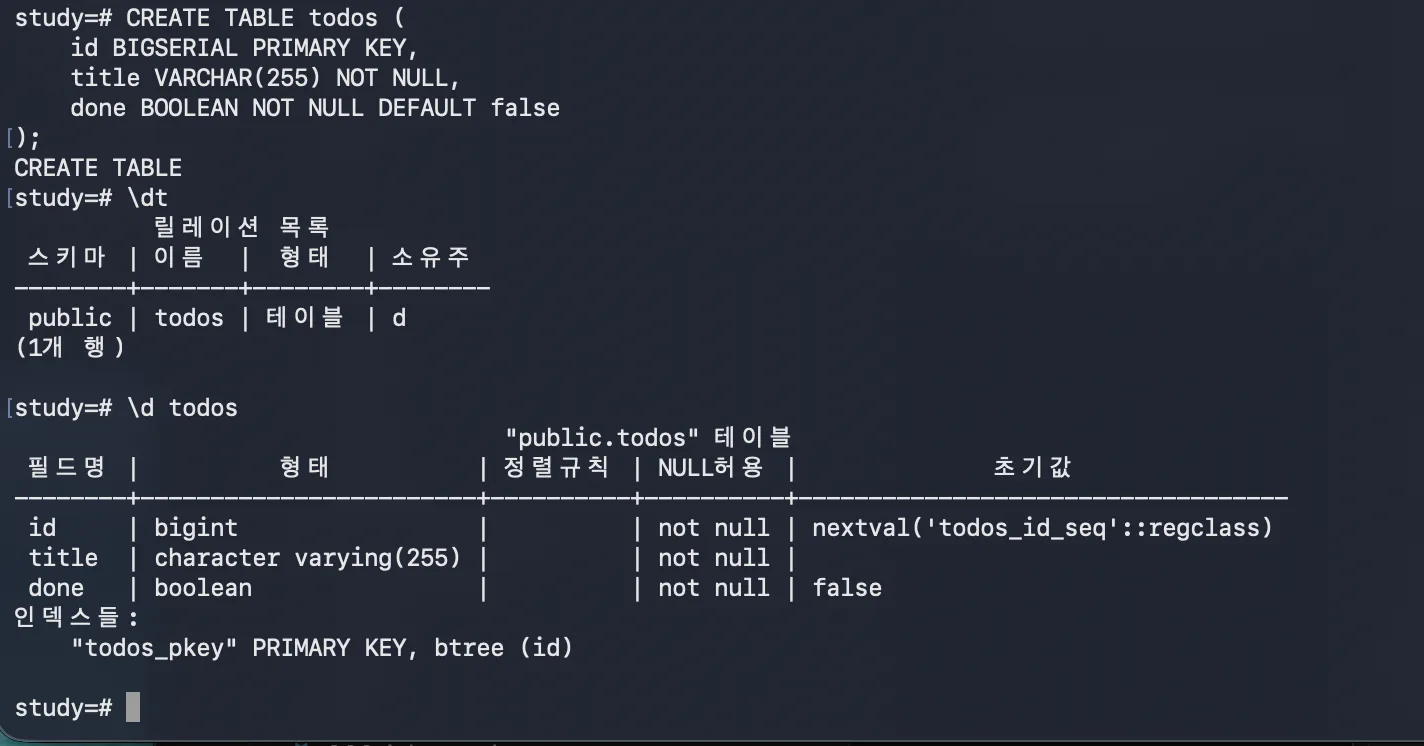
Setting BIGSERIAL as the PRIMARY KEY, I noticed in \d todos that the default value was set to nextval('todos_id_seq'::regclass). I could see firsthand that what corresponds to SQLite’s AUTOINCREMENT is handled internally by PostgreSQL through a sequence.
Mapping CRUD to SQL
It clicked for me that the CRUD I’d done in Java maps directly onto the SQL I learned today.
| SQL | Operation | REST / Method name |
|---|---|---|
INSERT INTO | Add | POST / create |
SELECT | Read | GET / findAll |
UPDATE ... SET | Modify | PUT / update |
DELETE FROM | Delete | DELETE / delete |
And WHERE shows up almost every time you use these commands. It’s the clause that decides which target the operation applies to, so it comes up with updates, deletes, and queries alike. It was the most frequently used piece by far.
What really matters isn’t SQL, but data structure design
Working through this, I had a thought: for databases, being able to design a data structure is far more important than memorizing SQL syntax.
Once you’ve designed which data structure to store things in, implementing it in SQL is something AI can churn out quickly these days. But designing a structure that satisfies requirements while properly respecting constraints like primary keys and foreign keys is ultimately something a person has to judge.
An interesting discovery — ORDER BY wasn’t sorting alphabetically
I ran into something interesting. I tried ORDER BY title ASC to sort titles alphabetically, but the sort order wasn’t alphabetical at all.
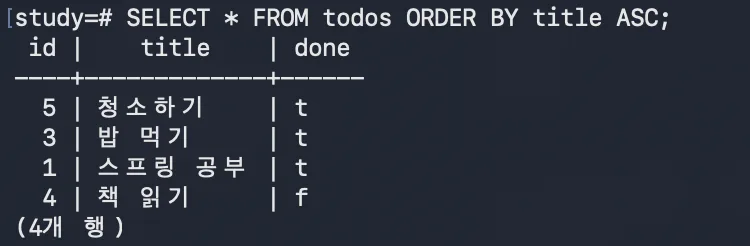
The result came out as “청소하기 → 밥 먹기 → 스프링 공부 → 책 읽기,” which is nothing like the correct alphabetical order (밥 → 스프링 → 청소 → 책).
To find the cause, I checked the database’s collation (sorting rule).
SELECT datcollate FROM pg_database WHERE datname = 'study';The result was en_US.UTF-8. In other words, this database was sorting based on US English rules. Since Korean text was being arranged roughly by Unicode code point order instead of Korean-language rules, the result looked scrambled.
So I looked for Korean collations installed on the system.
SELECT collname FROM pg_collation WHERE collname LIKE 'ko%';13 results came up, and I picked ko-KR-x-icu (a Korean locale provided by the ICU library). Specifying it explicitly with COLLATE gave me the sort order I wanted.
SELECT * FROM todos ORDER BY title COLLATE "ko-KR-x-icu" ASC;You can specify collation per query like this by attaching COLLATE, or you can bake it in permanently at column or database creation time. This time I just changed it for a single query.
Retrospective
The SQL commands themselves felt familiar, thanks to my SQLite experience. Even so, I arrived at the same conclusion twice today — how you design the database structure matters more than the syntax. The collation issue, too, ultimately came down to a design decision about “what rules should govern this data.”
Things to study further
- How to avoid attaching collation to every query — Typing
COLLATE "ko-KR-x-icu"every time is tedious. I want to compare specifying a default collation at the column definition level (title VARCHAR(255) COLLATE "ko-KR-x-icu") versus at database creation (CREATE DATABASE ... LC_COLLATE). → PostgreSQL: Collation Support - What exactly
ko-KR-x-icuis — The difference between collations with thex-icusuffix and libc-based collations (likeen_US.UTF-8), and why ICU is needed. → PostgreSQL: ICU Collations BIGSERIALvsIDENTITY— The sequence-based approach I saw in\d todos(nextval(...::regclass)). How this differs fromGENERATED ALWAYS AS IDENTITY, which is recommended in modern PostgreSQL. → PostgreSQL: Identity Columns- Practicing data structure design — Primary keys/foreign keys/normalization. Moving beyond a single todos table to practice tying multiple tables together with relationships (e.g., a user–todo relationship).
- Indexes —
\d todosalready showedtodos_pkeyset up as a btree index. How indexes connect to WHERE/ORDER BY performance.