
I’m recording a strange phenomenon I ran into while setting up a fresh blog with the AstroPaper template.
Table of contents
Open Table of contents
The situation
To make the blog my own, I did the following:
- Changed the site title, description, social links, etc. to my personal info
- Replaced the “Mingalaba” greeting in the homepage hero section with Korean
- Deleted all 17 sample posts that came bundled with AstroPaper
- Committed and pushed all the changes
On the local dev server (npm run dev), I got the clean empty post list I intended. But when I opened the site deployed on Vercel, this is what I saw.
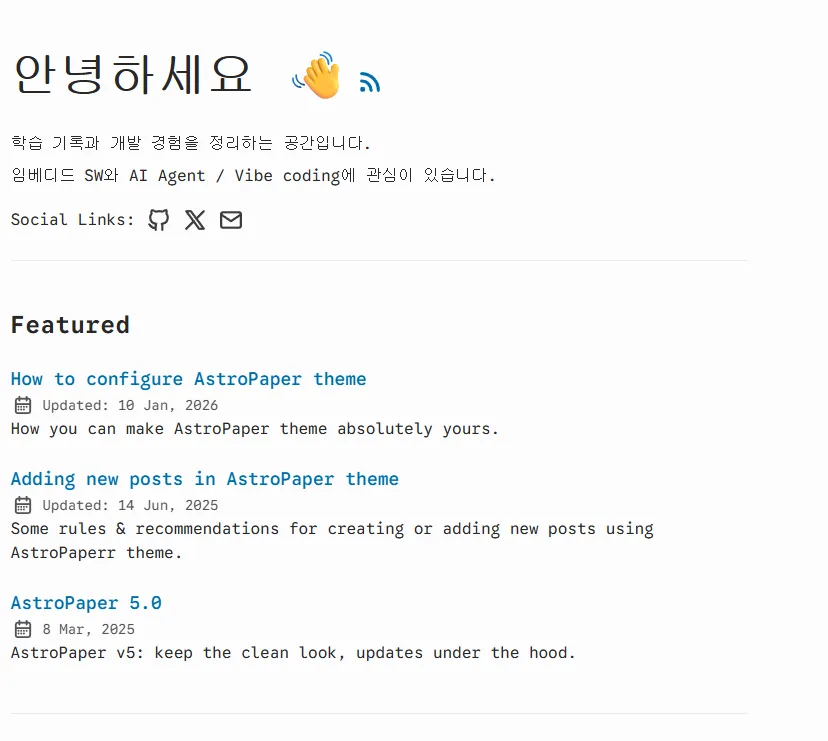
The Korean greeting in the hero section (“안녕하세요 👋”) was applied correctly, but the Featured section still showed the 3 sample posts I had deleted: “How to configure AstroPaper theme”, “Adding new posts in AstroPaper theme”, “AstroPaper 5.0”.
First check — is the code really clean
The first thing I suspected was a missed push. But when I checked the remote repository directly, everything was exactly as it should be.
$ git ls-tree origin/main src/data/blog/
100644 blob e69de29...    src/data/blog/.gitkeep
Nothing but .gitkeep. The remote code was clean.
I ran a build locally to check.
$ npx astro build
...
[content] Synced content
[WARN] [glob-loader] No files found matching "**/[^_]*.md" in directory "src/data/blog"
...
The collection "blog" does not exist or is empty.
...
✓ Completed in 1.45s.
[build] 7 page(s) built
[build] Complete!
The message The collection "blog" does not exist or is empty looks alarming, but it’s an informational log, not a fatal error. In fact, 7 pages were generated normally and the build finished successfully. I grepped the generated dist/index.html and found no trace of “Featured”, “Recent Posts”, or any of the old post titles.
In other words, the local build output was completely clean. The problem was on Vercel’s side.
Second attempt — force a trigger with a temporary post
I didn’t know the exact cause, but it seemed like a zero-content state was somehow hitting an edge case in the build/deploy pipeline. So I set up a simple hypothesis.
“If I create even a single post and push it, wouldn’t Vercel deploy the new build properly?”
I wrote a temporary hello-world.md file and pushed it. The result:

All 3 old sample posts disappeared and only the new post showed up. My hypothesis was correct.
Summary
- The local dev server and local build output were clean from the start.
- Only the site deployed on Vercel kept serving the old posts.
- The phenomenon didn’t go away while content count was at zero, but adding even a single post and pushing resolved it immediately.
Even though git had exactly the intended changes, this was a case where I confirmed firsthand that the hosting stage can produce a different result.
Things to study further
This time I resolved it via the workaround of “pushing a temporary post,” but the following questions remain unanswered. These are things to look into if I want to pin down the root cause.
1. How Astro content collections behave during build when empty
- Where and how is the
WARNthat theglobloader outputs when there are 0 matching files handled - When
getCollection("blog")returns an empty array, does it really have no effect on page generation - Reference: Astro Content Collections official docs
2. Vercel’s “Skipped Build” / “No changes” behavior
- Under what conditions does Vercel skip creating a new deployment and just move the alias to the previous deployment
- If the
pagefindstep or thecp -r dist/pagefind public/step fails, how does Vercel handle it (does it fall back to the previous deployment?) - Suspect point:
pagefind --site distin the build script — does it exit normally when there’s 0 content to index - Reference: Vercel Deployment Lifecycle
3. CDN/Edge caching
- What policy does Vercel Edge use to cache static assets
- Does CDN invalidation happen immediately after a new deployment, or gradually
- For what reason could an
index.htmlbuilt from an empty collection be excluded from cache invalidation
4. Pagefind behavior
- How does
pagefind --site distin the build script end when there are 0 markdown files to index (does it exit with code 0 or 1) - Because of the
&&chaining, if any single step fails, thecp -rafter it also won’t run → the build output could end up incomplete
5. Diagnosing faster next time
- Get in the habit of reading the Vercel deployment log all the way to the end
- Think in terms of “exactly how far did it get and where did it stop” rather than “why isn’t this working”
- Order of suspicion for next time this happens: ① remote git state → ② local build output → ③ end of the Vercel build log → ④ the deployed commit hash
Retrospective
The core of this debugging session was verifying the remote repository and the local build output directly to confirm “my code is correct,” and then narrowing down to a hosting-side issue. I spent some time early on suspecting a dev server cache issue, so next time, I’ll make verifying the remote + local build output the first step.