
Next up on the “things to study” list from the end of my streaming post: Prompt Caching. I ran a direct comparison using the same system prompt with and without caching, and the impression is clear. Bottom line up front: it’s practically essential for chatbots / agents / RAG.
Table of contents
Open Table of contents
One-line summary
When you send the same content to an LLM repeatedly, everything from the second call onward is processed almost for free.
Why caching matters
When an LLM receives input, it internally performs computationally expensive preprocessing. Repeating this work for the same input every time is pure waste. When you turn caching on, the server keeps the processing result and reuses it on subsequent calls.
4 scenarios where it has a big impact
- When a long system prompt is identical on every call
- When you put a long document into the context and ask multiple questions (RAG)
- Multi-turn conversations with a long history
- When there are many tool definitions (agents)
This pattern matched every part of the chatbot module in my personal app / autonomous driving side project, so I was even more interested.
Pricing structure

| Item | Unit price (Haiku 4.5) | Ratio |
|---|---|---|
| Normal input | $1 / M tokens | 1x |
| Cache write (first time caching) | $1.25 / M | 1.25x — slightly more expensive |
| Cache read (from the second call onward) | $0.10 / M | 0.1x — 90% discount |
Key point: the first call is slightly more expensive (1.25x), and everything from the second call onward is 90% cheaper (0.1x). In other words, if you’re sending the same context 2 or more times, it’s an unconditional win.
Cost simulation
Cumulative cost when sending the same context (1 unit) N times:
| Number of calls | Without caching | With caching | Savings |
|---|---|---|---|
| 1 | 1.00x | 1.25x | (slight loss) |
| 2 | 2.00x | 1.35x | −32% |
| 3 | 3.00x | 1.45x | −52% |
| 10 | 10.00x | 2.15x | −78% |
The savings grow rapidly as the number of calls increases. If you’re sending it 3+ times, caching is almost always a win.
Cache doesn’t last forever — TTL
Cache is kept for 5 minutes by default, and reportedly can be extended to 1 hour as an option. If a follow-up call comes within 5 minutes, it’s processed at the cache read price; after that, it expires and starts over from cache write.
→ This naturally fits chatbots / RAG / agents where usage flows continuously without interruption, and it’s less effective for workloads called sporadically.
A pitfall — minimum token count requirement
To use caching, you need input above a certain size. Small inputs don’t even qualify for caching.
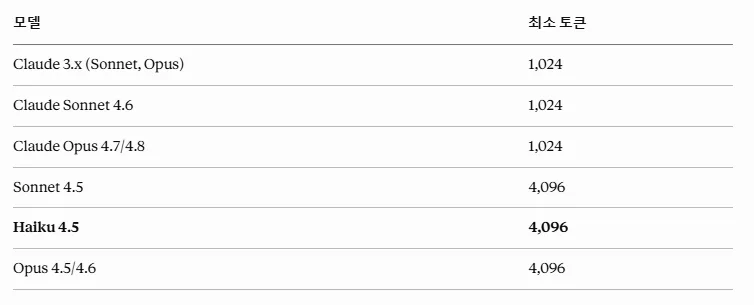
| Model | Minimum tokens to use cache |
|---|---|
| Claude 3.x (Sonnet, Opus) | 1,024 |
| Claude Sonnet 4.6 | 1,024 |
| Claude Opus 4.7 / 4.8 | 1,024 |
| Sonnet 4.5 | 4,096 |
| Haiku 4.5 (what I use) | 4,096 |
| Opus 4.5 / 4.6 | 4,096 |
In my first experiment, the system prompt was too short, so caching was ignored. You need to check the minimum token count per model in advance, and if it’s short, you should deliberately pad the system prompt with instructions or examples.
My own experiment — A vs B
I set up the same system prompt (embedded domain context) and asked 3 questions. Once without caching, once with caching turned on.
Example questions:
- “What’s the biggest difference between Cortex-M4 and M7?”
- “How do you prevent priority inversion in FreeRTOS?”
- “What should I watch out for when using DMA on STM32?”
Experiment A — No caching
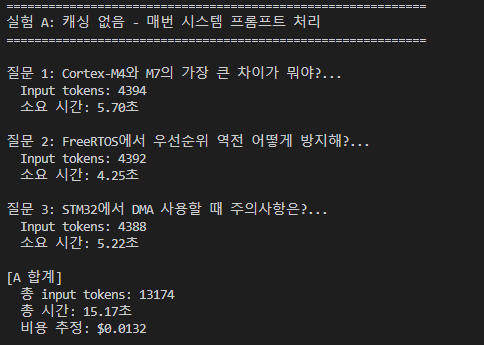
- Every question processes the entire system prompt → about 4,390 input tokens × 3 calls = 13,174 tokens
- Total time: 15.17 seconds
- Cost: $0.0132
Experiment B — With caching
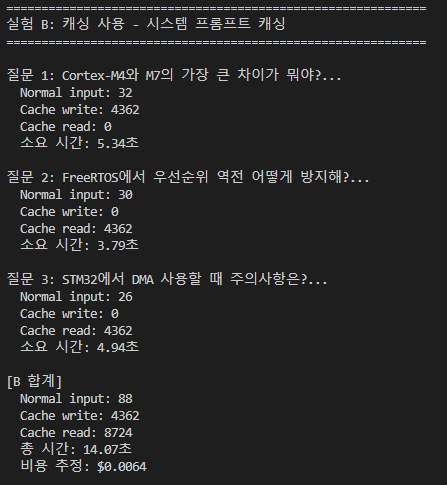
- First question: Normal input 32 + Cache write 4,362 (most expensive point)
- Second and third questions: Normal input 30/26 + Cache read 4,362 / 4,362 (this part is almost free)
- Total time: 14.07 seconds
- Cost: $0.0064
Comparison result
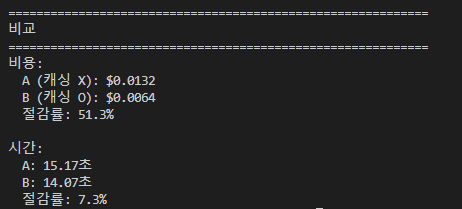
| Metric | Without caching | With caching | Savings |
|---|---|---|---|
| Cost | $0.0132 | $0.0064 | −51.3% |
| Time | 15.17s | 14.07s | −7.3% |
Cost drops by half, time drops only slightly. This is the honest conclusion. The core of prompt caching is token cost optimization, not TTFT improvement. (Cutting TTFT belongs to streaming territory — the two tools complement each other.)
Collection of trial and error
Pitfalls I ran into while working with this hands-on.
- Falling short of the minimum token count: With Haiku 4.5, you need 4,096+ tokens for caching to apply. If it falls short, it’s simply ignored (no error at all — it silently falls back to the normal input price)
- A single byte of difference causes a cache miss: If you mix a dynamic value like a timestamp into the system prompt, you get a fresh cache every time → pointless. You need to group the fixed part into a single block and separate out the dynamic part into the user message.
- 5-minute expiration: If the user steps away briefly and comes back, the cache expires → the next call starts from cache write again. This needs to be factored into your cost model design.
- A pattern that works well: “long fixed part + short dynamic part” — fix the system prompt so it caches, and send only the part that changes per turn in the user message.
Experiment code
I’ve uploaded the full comparison code to GitHub: github.com/dpcivl/ai-study-week1/blob/main/prompt_caching.py.
Aside from attaching the cache_control marker to the system prompt block, the client code is nearly unchanged. The key point is that a one-line addition can cut cost in half.
Things to study further
1. Multiple cache blocks / cache layering
- What difference it makes to cache the system prompt + tool definitions + RAG documents separately, each with its own cache_control marker
- Patterns for separating them so that if one expires, the rest stay alive
2. The 1-hour TTL option
- The price difference between the 5-minute vs. 1-hour options (I’ve heard there is one)
- Which workloads benefit from the 1-hour option (e.g., an hourly cron job, a business-hours chatbot)
3. Integrating caching with multi-turn chatbots
- How to add caching on top of the accumulating messages pattern from my multi-turn post
- How much of the accumulating history to group into a cache block (stable prefix vs. changing suffix)
4. Tool Use agents + caching
- Caching tool definitions in the agent loop from my Tool Use post
- Offsetting the cost of sending the full tool definitions every time an agent calls a tool N times, using caching
5. Next steps to measure directly
- How the savings rate changes as system prompt length grows from 4k → 8k → 16k
- Exactly how much shorter cache read response latency is — this experiment showed 7.3%, but it could be a much bigger difference with a longer prompt
- How cold starts and cache expiration interact when calling from Supabase Edge Functions in my personal app
Retrospective
Working with it hands-on, I now clearly understand why prompt caching is cited as the first tool for LLM cost optimization. “Cutting cost in half with a one-line marker” isn’t an exaggeration — it’s actually true.
That said, the pitfalls are just as real — falling short of the minimum token count gets silently ignored, mixing dynamic values into the system prompt is a cache-miss bomb, and the 5-minute TTL makes it less effective for sporadically called workloads. Learning the constraints of a tool matters just as much as learning its benefits when it comes to real-world application.
Next, I plan to upgrade the chatbot example from my multi-turn post to a caching-enabled version, and measure directly how cost changes as history accumulates.